Anyone looking for a new computer these days would be wise to check out the MacBook Pro. It’s easily one of the best laptops in the world and combines power and portability in ways that most of its rivals can only hope to match.
But how did Apple’s flagship laptop get here? This week marks the 20th anniversary of the first-ever MacBook Pro, giving us a great opportunity to look back at where the device came from and where it could be headed in the future. Here are five of the most important MacBook Pro models we’ve seen so far, and all the ways they have changed the world of computing forever.
MacBook Pro debut (2006)
Prior to 2006, Apple’s laptops had hit something of a dead end. They used PowerPC chips that had powered the Mac for years, but Apple was struggling to eke any more performance out of them without ramping up power consumption. That was a problem with laptops that could quickly get warm.
Enter Intel processors. These days, we might look at Intel chips as terribly inefficient compared to Apple silicon, but back in the mid-2000s, they were a (figuratively) hot property. Apple decided to make the switch, and at the same time, decided to ditch the PowerBook branding entirely and replace it with the MacBook Pro.

At WWDC 2005, Intel CEO Paul Otellini (right) joined Steve Jobs at the keynote address to announce Apple’s switch to Intel processors.
Foundry
As Steve Jobs explained on stage when he unveiled the MacBook Pro for the first time, Intel chips didn’t just give better overall performance, they gave better performance per watt, up to 4.5 times better than the PowerPC G5 that came before.
All that meant that Apple could finally do what it wanted to do with its pro-level laptops. The resulting MacBook Pro was packed with an Intel Core Duo chip, was made thinner than the PowerBook, came with a built-in iSight camera for video calls, and introduced the world to the much-loved MagSafe connector. It was a major overhaul of Apple’s laptop lineup, and such a significant one that the MacBook Pro name is still going strong today.
All-in-one unibody (2008)
Before 2008, the MacBook Pro’s chassis was made from several different components, including an internal frame, a top palm rest, several joining and strengthening elements, and more. That was acceptable enough, but Apple wanted something that was stronger and would help the device last longer. To do that, it had to rethink how it made its MacBooks, and the result was the advent of the unibody design.
This change meant that instead of being built from several pieces that were fitted together, the MacBook Pro’s body was now milled from a single piece of aluminum that was whittled down until it was the right shape. Internal components were then fitted inside this enclosure, completing the device.
As a result, the MacBook Pro became far, far stronger while also being much lighter. While the 2008 MacBook Air had used a unibody palm rest, that year’s MacBook Pro was the first Apple laptop to be entirely constructed in this way. It’s a blueprint that MacBooks of all stripes have followed ever since.
The 2008 MacBook Pro wasn’t just about its unibody design. It also came with powerful Nvidia graphics options, a larger trackpad with multi-touch and support for clicking anywhere on its surface, and a bright LED display that was an impressively slim part of the device. But while it was less showy than any of these elements, the unibody chassis has had just as much of an impact, strengthening and simplifying the laptop’s case in the almost 20 years since.
Retina display (2012)
The Retina display first appeared in 2010 in the iPhone 4 and the iPod touch, but didn’t make its way to the MacBook Pro until two years later. In 2012, Apple was ready to lift the lid on a new pro-level laptop featuring the display tech that everyone was talking about.
With a Retina display in effect, the pixels on the MacBook Pro’s screen were too small to discern from a normal viewing distance. That helped to sharpen up everything you viewed on your device, giving a sense of crispness and quality that was lacking before.
Elsewhere, the 2012 MacBook Pro was significant for a wealth of other reasons. Its chassis was 25 percent thinner than its predecessor, it came with SSD storage as standard, it dropped the optical drive and FireWire 800 and ushered in HDMI, USB 3.0, and MagSafe 2, while the number of Thunderbolt ports also increased.
At the same time, Apple took many steps to make the MacBook Pro much harder to access and repair its internals. The battery and memory were glued in place, and while the SSD was not fixed this way, it used a proprietary connector and form factor that made replacement difficult. Apple also started using proprietary pentalobe screws more extensively, and these were not compatible with standard tools. While Apple has started to ease up on this kind of behavior in recent years, it’s a pattern that still hasn’t completely gone away.
Touch Bar (2016)
Think back to the most controversial design decisions that Apple has made over the years. There have been plenty, but the 2016 MacBook Pro got not one but two of them in the form of the butterfly keyboard and the Touch Bar.
The butterfly keyboard cut key travel down to the barest minimum. While this probably helped to free up more internal space for other components, it resulted in an unresponsive, unsatisfying typing feel with keys that were prone to getting stuck and jammed. To its detractors, the butterfly keyboard was a prime example of Apple pursuing its ideal of thin and light at the expense of practicality.
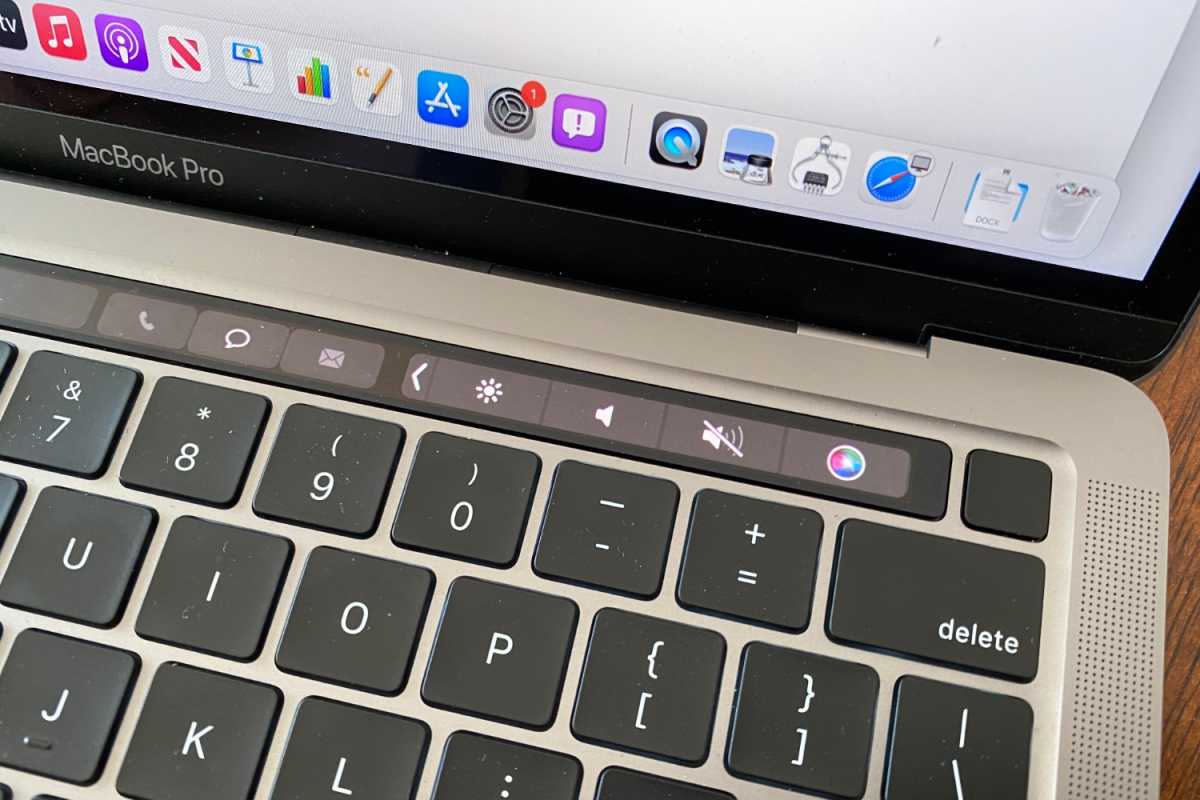
Apple dropped the Touch Bar from the MacBook Pro with the introduction of the 14- and 16-inch MacBook Pro in 2023.
IDG
The Touch Bar, meanwhile, was a touch-sensitive OLED display that sat at the top of the keyboard, replacing the row of function keys. It was populated with a range of buttons and actions that changed dynamically depending on which app was in use. Unfortunately, it never really took off: it wasn’t compelling enough to convince users, while it lacked the kind of third-party integrations that could have converted them.
The 2016 MacBook Pro wasn’t all bad. The trackpad was roughly twice as large as the one on its predecessor, giving you more room for swipes and gestures. But this MacBook Pro was also known for replacing every port with a USB-C slot–given how little USB-C was in use at the time, it meant you needed an adapter for almost anything you wanted to connect. Tellingly, the butterfly keyboard, Touch Bar, and USB-C exclusivity have all been dropped or rolled back by Apple in the years since.
Apple silicon (2020)
If the 2016 MacBook Pro was divisive, the 2020 edition has received close to universal acclaim since it launched, and that’s almost entirely down to a single change: the introduction of Apple silicon and the M-series chips in the Mac. Whereas past MacBook Pros were known to be good but not world-beating, Apple silicon changed all that and helped Apple’s laptop ascend to the pinnacle of portable computing – a position it still occupies today.
The differences were profound. Intel chips had made MacBook Pros hot and loud while offering performance that wouldn’t exactly cause customers to rush to a local Apple Store. Apple silicon, though, managed to do the impossible: it massively ramped up performance while doing so in a much more efficient package, resulting in a cooler, quieter operation that put far less strain on the battery. Battery life was so much better, in fact, that Apple engineers initially thought their testing software was broken.
Despite the paradigm shift that the new chip brought, Apple took it easy when it came to the MacBook Pro design. The 2020 MacBook Pro used the exact same design as the model that came before it, including the Touch Bar and screen sizes. These would both be changed within the next year.
With the advent of Apple silicon, Apple showed that it still knew what it took to make a blazing-fast laptop that smoked the competition. It helped counter arguments that the MacBook Pro was overpriced and underperforming, and today makes it a strong option if you’re after a device that can handle demanding workflows without sounding like a jet engine taking off.
The future of the MacBook Pro
Now that we know how the MacBook Pro got to where it is today, where is it going? If the rumors are correct, the next edition could be just as significant as the models we’ve covered in this article.
The biggest new features are said to be coming to the display. First, the MacBook Pro will finally get an OLED screen. This will be an upgrade over the current mini-LED display currently in use and could bring better contrast and black levels to the laptop.
Aside from that, Apple is also expected to outfit this MacBook Pro with touchscreen technology. The company has long eschewed this feature, and Steve Jobs himself called it “ergonomically terrible.” Yet the rumors that Apple is building in this functionality have not gone away, and it now seems more likely than not that Apple is about to perform a dramatic about-turn.
Few other details are known, other than the idea that the MacBook Pro’s chassis will be slimmed down from its current level. It’s also expected to launch sometime around late 2026 or early 2027. The high-end display features are thought to be reserved for the M6 Pro and M6 Max models, although they’ll probably trickle down to the entry-level MacBook Pro in the coming years.