Which Mac is best for you?
Whether you want everyday portability, professional creative power, desktop performance, or budget-friendly computing, Apple’s lineup has a Mac that fits. For just $599 you can own a MacBook Neo, which is Apple’s most affordable laptop, for a little more, the MacBook Air (M5) excels at everyday work and battery life, while the MacBook Pro lineup delivers serious power for pros. On the other hand, desktops like the Mac Studio and iMac stand out for creators and home setups, while the Mac mini offers great value if you don’t need portability.
Choosing the best Mac in 2026 isn’t just about buying the newest model, it’s about matching Apple’s vast lineup to what you actually need from a computer. From ultraportable MacBooks to powerful desktop Macs, each option excels at different tasks. So whether you are a creative, a professional, a student, or an everyday user, we will help you identify the Mac that suits your needs.
In our Mac buying guide, you’ll find everything you need to know about the MacBook Neo, MacBook Air, MacBook Pro, Mac mini, iMac, Mac Pro, and Mac Studio, with expert buying advice to help you choose the machine (and configuration) that’s right for you. With seven different types of Mac on offer: MacBook Neo, MacBook Air, MacBook Pro, Mac mini, iMac, Mac Studio, and Mac Pro, and variations in the size, specs, and features within each of those categories, things can get pretty complicated. That’s where this guide comes in, helping you make the right decision so you can find the Mac that matches your needs, whether its the best value for money, the most powerful, the most portable, or a combination of all those things.
Best Mac 2026: Mac & MacBook Buyers Guide
Our top choice of Mac in 2026 is the MacBook Air because it offers a great combination of value for money in a compact package that will appeal to the typical Mac user. However, that may not be the best Mac for you if you need the most powerful Mac, in which case we would recommend the MacBook Pro which brings you all the power you could need in a portable form. If it’s something cheaper you are after then Apple’s new MacBook Neo is sure to appeal, starting at just $599/£599.
If you don’t need a laptop Mac there are some excellent options in Apple’s desktop range, with the Mac Studio providing the best value for money and saving thousands compared to a similarly specced Mac laptop. If a low budget option is what you are looking for then look no further than the Mac mini, which is the cheapest Mac desktop at $599/£599.
Below we’ll take you through each Mac currently available from Apple, to give you an overview of what’s on offer and what you’ve got to choose from, you’ll also find live prices so you can get the best price today for each of the Macs included below. We also have additional advice for choosing the best Mac laptop in our comparison of the MacBook Air vs MacBook Pro.
Not every Mac is right for every user, so we’ve grouped Apple’s current Macs by who they’re best for – from everyday users to professionals.
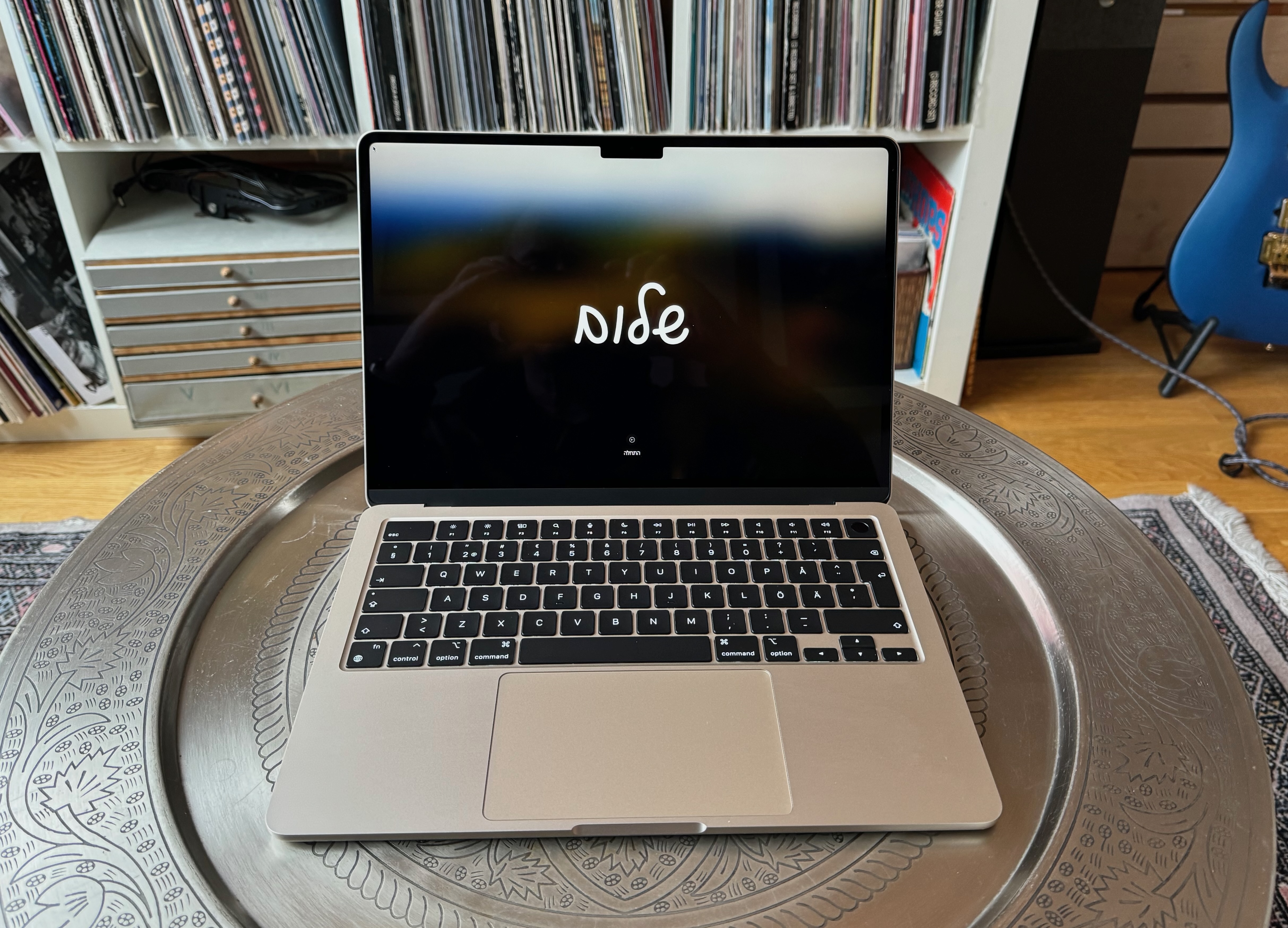
13-inch MacBook Air, M5 (2026) – Best Mac for most people
Best Prices Today:

What is it? The 13-inch MacBook Air is Apple’s most affordable laptop, designed with portability in mind.
What’s new? Apple introduced the M5 MacBook Air in March 2026, featuring the new M5 chip for faster CPU and GPU performance. The base configuration now starts with 512GB of storage (double the previous model), along with faster SSD speeds, more memory bandwidth, and support for Wi-Fi 7 and Bluetooth 6.
Who’s it for? It’s perfect for students and everyday users who want a lightweight laptop that’s easy to carry, and powerful enough for working, studying, browsing, and doing light creative work. If you want a larger screen there is a 15-inch MacBook Air, which we discuss below.
How much does the 13-inch MacBook Air cost? The entry-level 13-inch M5 MacBook Air costs from $1,099/£1,099, which is $100/£100 more than the previous generation, but does offer twice as much storage. You can create build-to-order models with more memory (up to 32GB) or storage (up to 4TB).
What are the specifications? The standard specs for the M5 MacBook Air offer an improvement on the previous generation. The MacBook Air now ships with 512GB SSD as standard. The actual screen measurements, measured diagonally are 13.6in
- Apple M5, 10-core CPU, 8-core GPU, 16GB memory, 512GB SSD, two Thunderbolt 4 ports: $1,099/£1,099.
- Apple M5, 10-core CPU, 10-core GPU, 16GB memory, 512GB SSD, two Thunderbolt 4 ports: $1,199/£1,199.
- Additional options: Up to 32GB memory, 4TB storage.
What are display specifications?
- The 13.6-inch Liquid Retina on the M5 MacBook Air display has a native resolution of 2,560×1,664 and 500 nits brightness.
- The MacBook Air M5 can support two external displays.
How do I connect stuff? The M5 MacBook Air models supports Thunderbolt 4, which means that they can support a dual monitor set up. If you want to connect USB-A devices, you need either a USB-C to USB adapter, like Apple’s $19 / £19 one, or a USB-C hub that has USB-A ports. In the U.K. and Europe Apple has stopped including a Power Adapter in the box, so you will need to buy one separately. See our round-up of the best USB-C hubs and adapters.
The 2026 MacBook Air offers Wi-Fi 7 (802.11be) for connecting to a network. It also provides built-in Bluetooth (6) for wirelessly connecting a mouse or other peripherals. If you want to connect to an ethernet network, you need an adapter.
How fast is it? In our tests the M5 saw consistent gains over the M4 in the previous generation, as you can see in our Mac processor benchmarks. In some benchmarks the M3 even beats the M1 Ultra. If you are upgrading from an old Mac – especially if it is one with an Intel chip – you will see a huge difference.
Any other considerations? The MacBook Air should be more than fast enough for general-purpose use. The only issue is that, because it doesn’t have an internal fan, it may slow down during long processing sessions to keep cool. So if you are likely to be video editing or compiling code the MacBook Pro with its fan is a better choice. Also note that (as with almost all Macs) it’s impossible to upgrade the storage or memory after purchase, so you should buy the model with the largest amount of storage and memory you can afford.
Why we recommend the 13-inch MacBook Air: The MacBook Air is a great choice for someone who does general-purpose work and moves around a lot, such as a student or a self-employed person.
We compare the MacBook Air vs MacBook Pro separately.
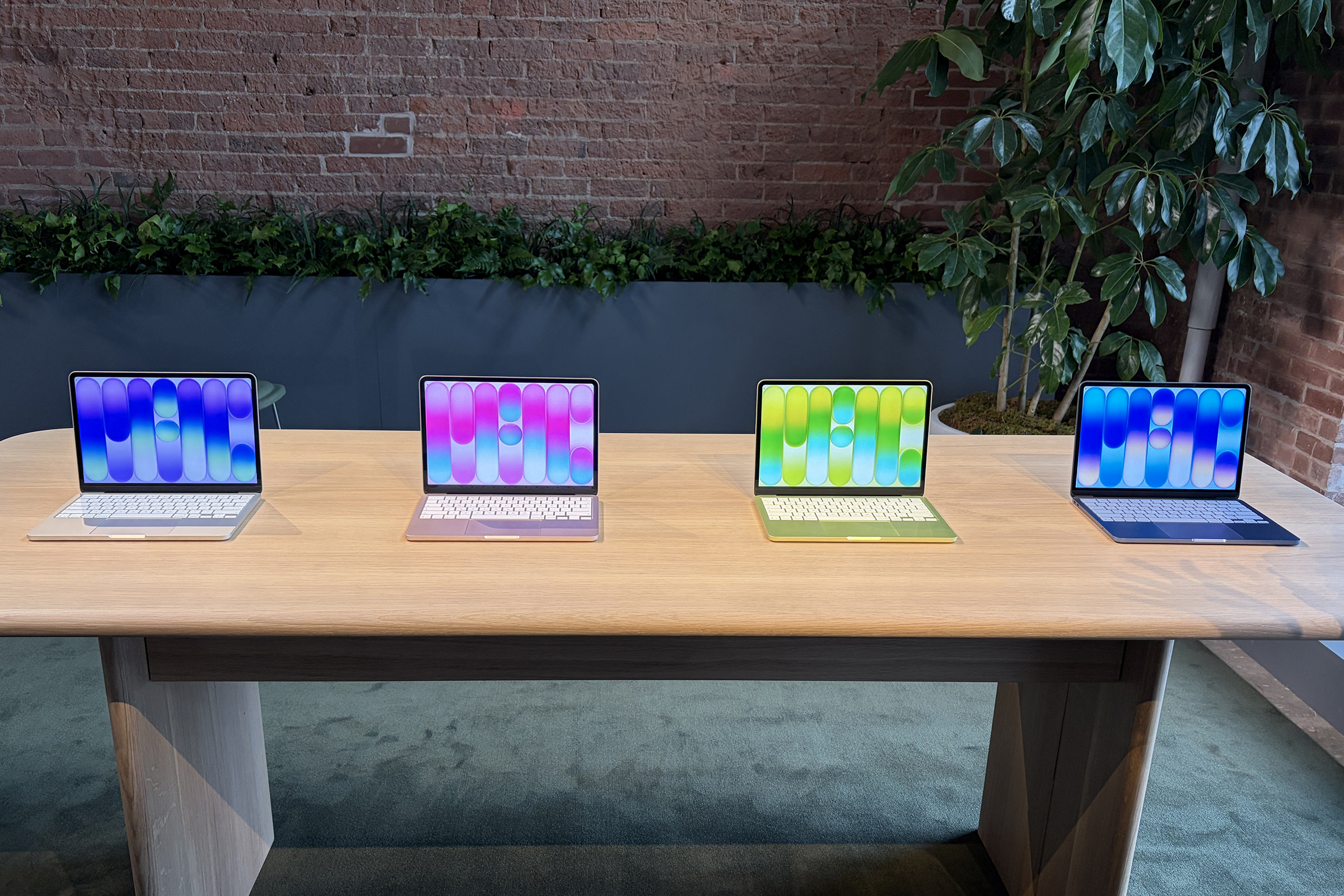
Apple MacBook Neo – Best for students & first-time buyers
Best Prices Today:
What’s new? The MacBook Neo is Apple’s new entry-level Mac laptop. It’s powered by an iPhone-class chip (the A18 Pro) rather than an M-series processor, and it introduces a colorful design and a simplified feature set at a much lower starting price.
Who’s it for? The MacBook New is designed to appeal to students and those who want to use a laptop for everyday tasks like web browsing, video calls, schoolwork, streaming, email and office apps. Because it uses an A18 Pro iPhone chip and is limited to 8GB of non-upgradable RAM, it is not suitable for heavy video editing or large-scale photo processing.
How much does the MacBook Neo cost? The MacBook Neo is the the cheapest Mac laptop Apple has ever released, starting at $599/£599.
What are the specifications? The MacBook Neo is the first Mac to use an A-series processor, the same family used in iPhones. That chip has a 6-core CPU and 5-core GPU, 8GB unified memory, and either 256GB or 512GB storage.
- Apple A19 Pro, 6-core CPU, 5-core GPU, 8GB memory, 256GB SSD, two USB-C ports: $599/£599.
- Apple A19 Pro, 6-core CPU, 5-core GPU, 8GB memory, 512GB SSD, two USB-C ports: $699/£699.
- Additional options: None.
What are display specifications? The MacBook Neo features a 13-inch Liquid Retina display with 2,408×1,506 resolution at 220 ppi, at up to 500 nits and sRGB color. That should be good enough for everyday work.
How do I connect stuff? Connectivity is basic. There are two USB-C ports; one is USB 3, the other is slower USB 2). There isn’t a separate MagSafe port so charging is via USB-C. There is a 3.5mm headphone jack. Wi-Fi 6E and Bluetooth 6 are included.
How fast is it? MacBook Neo uses the A18 Pro chip that first appeared in the iPhone 16 Pro. Our tests and benchmarks of that chip indicate that it will be similar in performance to the M1. That will be suitable for everyday tasks like web browsing, streaming, and office apps.
Any other considerations? To get to the low price Apple has made several trade-offs. The MacBook Neo lacks Thunderbolt and MagSafe support, there is no keyboard backlight, no Touch ID on the base model, and RAM is limited to 8GB with no option to increase that to 16GB.
Why we recommend the MacBook Neo: This is the most affordable way to own a Mac laptop – unless you buy a used model. If you don’t need pro-level performance it’s a very compelling entry-point into Apple’s ecosystem.
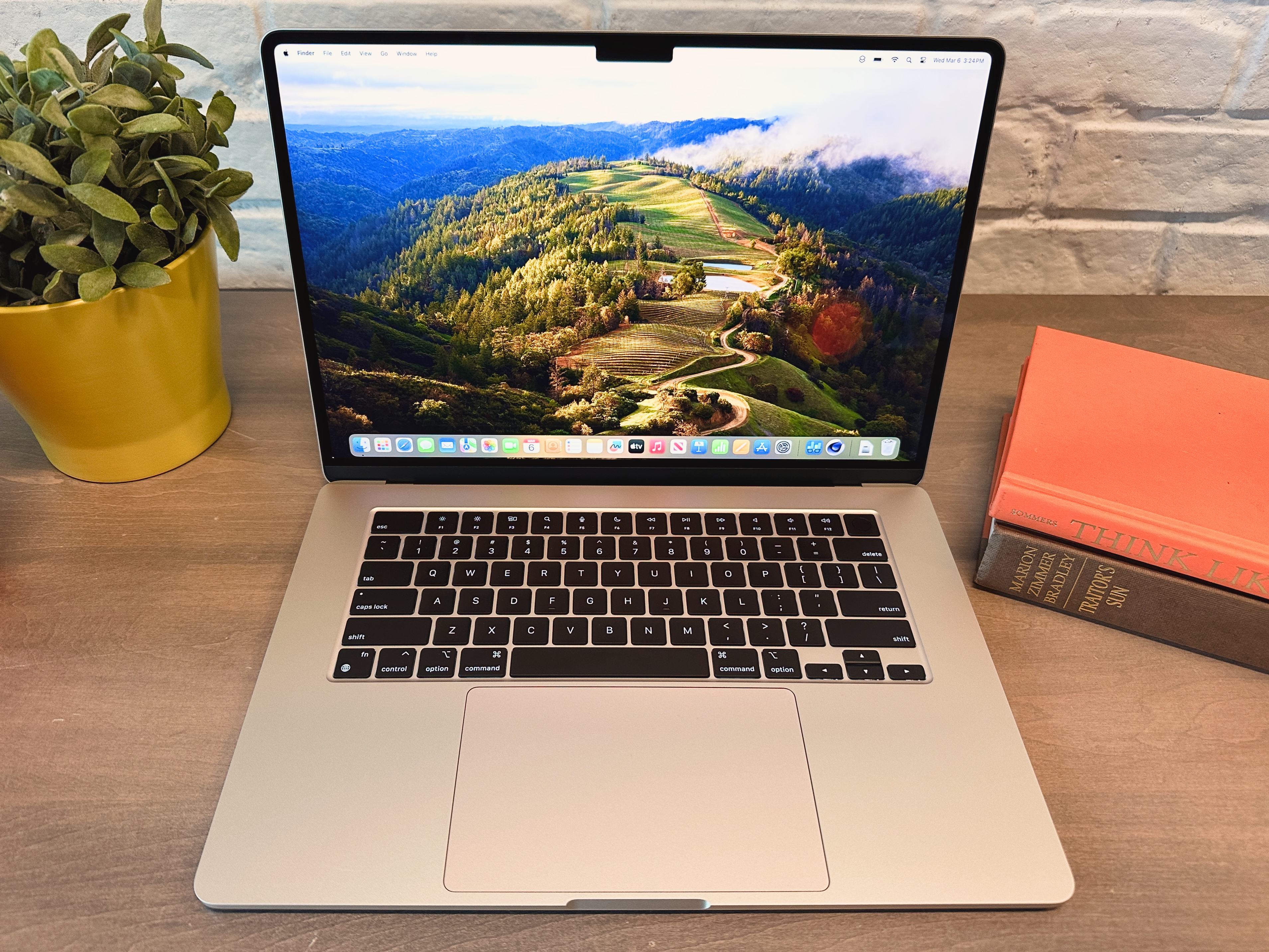
Apple 15-inch MacBook Air (M5, 2026) – Best value big screen
Best Prices Today:
What is it? The 15-inch MacBook Air is essentially identical to the 13-inch model above aside from the bigger screen and six-speaker system rather than four speakers. Surprisingly, battery life isn’t better on the 15-inch, despite the bigger battery.
What’s new? The M5 MacBook Air arrived in March 2026. Like the 13-inch version it features the M5 chip for faster CPU and GPU performance. The base configuration now starts with 512GB of storage (double the previous model), along with faster SSD speeds, more memory bandwidth, and support for Wi-Fi 7 and Bluetooth 6.
Who’s it for? The 15.3-inch MacBook Air is ideal for anyone who wants a big-screen laptop for far less than the price of a 14-inch or 16-inch MacBook Pro. The big screen will allow more room for spreadsheets and browser tabs, and for multitasking with multiple apps open. It’s also great choice for anyone who values portability due to its lightweight and thin design.
How much does the 15-inch MacBook Air cost? With the introduction of the M4, Apple reduced the price of the 15-inch model to $1,199/£1,199 from $1,299/£1,299. There are three configurations and you can create build-to-order models with up to 32GB memory and 2TB storage.
What are the specifications? The specifications of the 15-inch M5 MacBook Air are generally the same as the 13-inch model, expect there is no 8-core GPU option here. The actual screen measurements, measured diagonally are 15.3in. You are essentially paying $200/£200 more for the bigger screen.
- Apple M5, 10-core CPU, 10-core GPU, 16GB memory, 512GB SSD, two Thunderbolt 4 ports: $1,299/£1,299.
- Additional options: Up to 32GB memory, 4TB storage.
What are display specifications?
- The 15.3-inch Liquid Retina display has a native resolution of 2,880×1,864 and 500 nits brightness.
- The MacBook Air M5 can support two external displays.
How do I connect stuff? The M5 MacBook Air models support Thunderbolt 4 and can now support a dual monitor set up. For USB-A devices you need a USB-C to USB adapter (Apple sells one for $19 / £19), or a USB-C hub with USB-A ports. In the U.K. and Europe Apple has stopped including a Power Adapter in the box, so you will need to buy one separately. See our round-up of the best USB-C hubs and adapters.
The 2026 MacBook Air offers the new standards of Wi-Fi 7 (802.11be) and Bluetooth (6). If you want to connect to an ethernet network, you need an adapter.
How fast is it? This is the same M5 as found in the 14-inch MacBook Pro, so you can expect similar performance. In our tests we found the M5 to be faster than the M1 Ultra in some benchmarks. If you are updating from an older Mac expect a big boost.
Any other considerations? The Air doesn’t have a fan to keep the computer cool, so it may throttle down its speed during long processing sessions, such as video editing or compiling code. If that’s the kind of work you intend to do, a MacBook Pro would be a better option. Also note that you won’t be able to update RAM or storage later, so get as much as you can afford.
Why we recommend the 15-inch MacBook Air: Starting at $1,299/£1,299, the 15-inch MacBook Air is a much more affordable Mac laptop than the 14-inch MacBook Pro, which starts at $1,699/£1,699, so if you want your screen to be bigger than 13 inches, and you don’t need the power of a MacBook Pro for the kind of work you do, the 15-inch MacBook Air is a great option.

Apple 14-inch MacBook Pro (M5, 2025) – Powerful Mac laptop for the masses
Best Prices Today:
What is it? There are three distinct types of MacBook Pro, the M5 model discussed here, and the M5 Pro and M5 Max models we look at separately. Like it’s more powerful siblings, the M5 MacBook Pro has an HDR ProMotion display, which the MacBook Air lacks. The MacBook Pro offers more ports than the MacBook Air: HDMI and SDXC slots. The 14-inch MacBook Pro offers 24 hour battery life – which, along with the 16-inch MacBook Pro with M5 Pro chip, is the best battery life ever on a MacBook.
What’s new? In October 2025 Apple updated the 14-inch MacBook Pro with the M5 chip. There were no other major changes, aside from the new option to add 4TB storage at point of sale. Bigger changes came with the launch of the M4 MacBook Pro in October 2024, back then we saw RAM increase from 8GB to 16GB as standard, camera improvements, and Thunderbolt 4 support.
Who’s it for? The 14-inch MacBook Pro is for a more demanding user than the MacBook Air. Its main benefit is the design allows for better cooling, which means that if you push the machine it won’t slow down to avoid overheating. However, there are other MacBook Pros available from Apple (including a 16-inch model) that offer faster processors, so if you really need a powerful machine one of those might be more suitable–we discuss the M5 Pro and M5 Max models below.
How much does the 14-inch MacBook Pro cost? The entry-level 14-inch MacBook Pro starts at $1,699/£1,699. Prior to March 2026 it costs $1,599/£1,599, but Apple hiked prices with the introduction of the M5 Pro and M5 Max models.
What are the specifications? The standard specs for the 14-inch MacBook Pro offer an improvement on the previous generation. The MacBook Pro now ships with 1TB SSD as standard, up from 512GB. The screen measurements, measured diagonally are 14.2in.
- Apple M5, 10-core CPU, 10-core GPU, 16GB memory, 1TB SSD, three Thunderbolt 4 ports, SDXC, HDMI, $1,699/£1,699.
- Additional options: 32GB memory; up to 4TB storage
What are display specifications?
- The 14.2-inch Liquid Retina XDR display has a native resolution of 3,024×1,964 and 1,000 nits brightness, 1600 nits peak, 600 nits SDR brightness, and ProMotion for adaptive refresh rates up to 120Hz.
- The notch at the top of the display conceals the 12MP FaceTime camera which now features Centre Stage.
How do I connect stuff? There are three Thunderbolt 4 ports (up from just two on the older model). These are compatible with USB-C (if you have wired devices that aren’t USB-C or are an older version of Thunderbolt, you’ll need an adapter, we have a separate MacBook Pro Thunderbolt adapter guide to help you decide which ones you’ll need). The 14-inch MacBook Pro also comes with an HDMI port for connecting an external display or projector, and an SDXC Card slot for plugging in memory cards from cameras, audio recorders, and other devices. The HDMI port also supports multichannel audio output. The 14-inch M5 MacBook Pro still has the older Wi-Fi 6E (802.11ax) and Bluetooth 5.3 for wireless connectivity (the other MacBook Pro models and Air have been updated to the newer standards. In the U.K. and Europe Apple has stopped including a Power Adapter in the box, so you will need to buy one separately.
How fast is it? Apple described the M5 chip in the MacBook Pro as offering a “big leap” in AI performance thanks to a Neural Accelerator in each core. It also offers 4x better graphics performance compared to the M4, according to Apple. In some of our tests the M5 beat the M1 Ultra, which shows the progress Apple has made with its silicon over the past few years. The MacBook Air matches the specs of the M5 MacBook Pro, but the Pro outperforms the Air due to the inclusion of a fan for cooling (the MacBook Air doesn’t have the space for this). If you need it, more power is available from the MacBook Pro with M5 Pro or Max.
Any other considerations? As usual our advice is to max out the RAM (aka Unified Memory) and storage when you buy a Mac because you can’t update it later on.
Why we recommend the 14-inch MacBook Pro (M5): The 14-inch MacBook Pro costs $1,699/£1,699, which is much more than the 13-inch MacBook Air at $1,099/£1,099. However the $500/£500 difference is misleading: when comparing like for like: the 15-inch MacBook Air with 1TB SSD costs $1,499/£1,499, which is $200/£200 less than the 14-inch MacBook Pro with the same 1TB SSD. For that extra $200 you get a bigger screen on a machine that is better suited to processor intensive work.
Read our full
Apple 14-inch MacBook Pro (M5, 2025) review
14-inch MacBook Pro (M5 Pro/M5 Max, 2026) – Best MacBook for professional workers and creators
Best Prices Today:
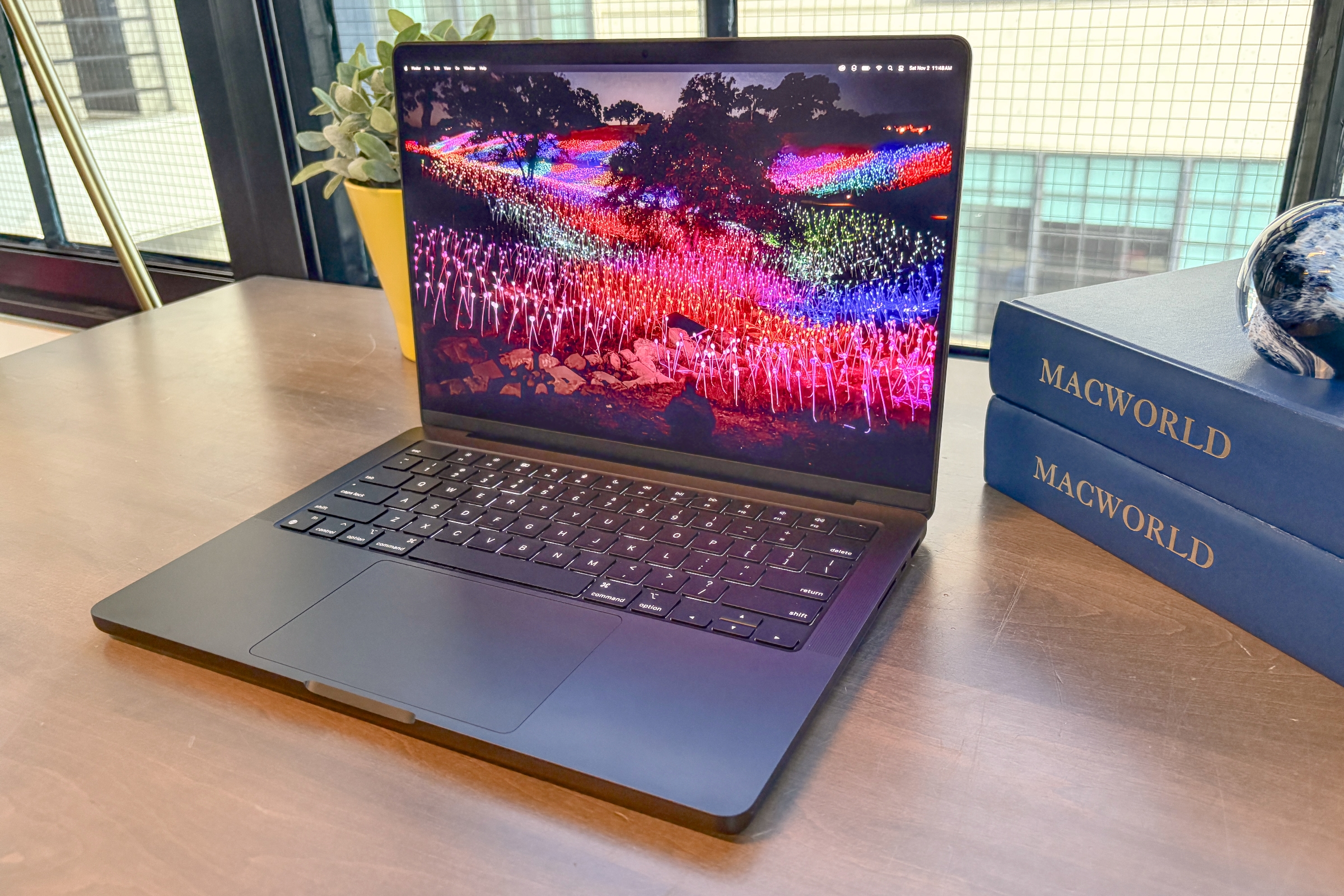
What is it? The 14-inch MacBook Pro can also be configured with an M5 Pro or M5 Max chip, which are much more powerful than the standard chip in the M5 MacBook Pro. The Pro and Max MacBook Pro can support up to 18-core CPU, 40-core GPU, 128GB memory and 8TB storage, for a seriously fast Mac laptop. There’s a larger 16-inch MacBook Pro with similar specs that we discuss below.
What’s new? The 14-inch MacBook Pro with M5 Pro or M5 Max was introduced in March 2026 and introduces Apple’s new Fusion Architecture chip that combines two 3nm CPU and GPU dies into a single unified system on a chip, which lets Apple scale performance and efficiency. In addition, the GPU includes a Neural Accelerator in every core, which Apple claims delivers up to 4x the AI performance of the previous generation. There is also faster memory and faster SSD speeds.
Who’s it for? If your work demands serious processing power, these machines are built to handle it. If you regularly work in professional software, the 14-inch MacBook Pro is a strong choice, and with either the M5 Pro or M5 Max chip they’re the most powerful laptops Apple has ever made. The 14-inch model costs less than the 16-inch version, making it the more budget-friendly option, and if you use an external monitor the screen size matters less. The M5 Pro MacBook Pro is designed for demanding professional tasks like software development, managing large photo libraries, or editing 4K video, while the M5 Max is aimed at even heavier workflows such as 3D animation, complex simulations, AI development, and high-end video production.
How much does the 14-inch MacBook Pro cost? The price starts at $2,199/£2,199 for the M5 Pro. That’s up from $1,999/£1,999 for the previous generation, but it comes with 1TB SSD instead of 512GB. The M5 Max version starts at $3,599/£3,599, which is a big leap from the previous price of $3,199/£3,199, but now offers 2TB SSD as standard, rather then 1TB SSD.
What are the specifications? Here are the standard configurations for the 14-inch MacBook Pro. The screen measures 14.2in.
- Apple M5 Pro, 15-core CPU, 16-core GPU, 24GB memory, 1TB SSD, three Thunderbolt 5 ports, SDXC, HDMI, $2,199/£2,199.
- Apple M5 Pro, 18-core CPU, 20-core GPU, 24GB memory, 1TB SSD, three Thunderbolt 5 ports, SDXC, HDMI, $2,399/£2,399.
- Apple M5 Max, 18-core CPU, 32-core GPU, 36GB memory, 2TB SSD, three Thunderbolt 5 ports, SDXC, HDMI, $3,599/£3,599.
- Apple M5 Max, 18-core CPU, 40-core GPU, 48GB memory, 2TB SSD, three Thunderbolt 5 ports, SDXC, HDMI, $4,099/£4,099.
- Additional options: 128GB memory; up to 8TB storage, Nano-texture display.
What are display specifications?
- The 14.2-inch Liquid Retina XDR display hasn’t changed from its native resolution of 3,024×1,964, 254 pixels per inch, 1,600 nits of maximum brightness and 1,000 nits for HDR content, but it now offers 1000 nits for standard content, up from 600. You’ll also get a 1,000,000-to-1 contrast ratio and ProMotion support with a refresh rate up to 120Hz.
- The notch at the top of the display conceals the 12MP Center Stage camera with support for Desk View and 1080p HD video recording. The notch does not affect the available screen area—the work area is a 16-by-10 space, while the screen surrounding the notch is considered extra space and is used to display the menu bar.
How do I connect stuff? Unlike the M5 model, the 14-inch MacBook Pro with M5 Pro and Max offers Wi-Fi 7 (802.11be) and Bluetooth 6 for wireless connectivity. There are three Thunderbolt 5/USB C ports, an SDXC slot for plugging in memory cards from cameras, audio recorders, and other devices, and an HDMI port for connecting an external display or projector (the HDMI port supports multichannel audio output). In the U.K. and Europe Apple has stopped including a Power Adapter in the box, so you will need to buy one separately.
How fast is it? Apple built the 14-inch and 16-inch MacBook Pro models with pro users in mind and it shows in the performance. With the M5 Pro and M5 Max you can enjoy the fastest Mac laptops Apple has ever made – the company claims 30% faster performance and stronger AI and graphics capabilities than the M4 generation. When it comes to graphics prowess the Max will always beat the Pro, so if you need the fastest then you’ll want the M5 Max.
Any other considerations? The MacBook Pro models with M5 Pro chips cost significantly more than other Macs, and the Max version costs even more, so you should consider whether the extra performance will actually benefit your workflow.
Why we recommend the 14-inch MacBook Pro (M5 Pro or M5 Max): If you want a laptop that can handle any task you throw at it—and you don’t have a constraining budget—you want a MacBook Pro. The only reason not to buy the 14-inch M5 Pro or M5 Max MacBook Pro would be if you saw a good deal on the discontinued M4 Pro/M4 Max version–we’ve been seeing some excellent deals and price cuts on older models, just remember that that there was less storage in those model (512GB rather than 1GB at the entry-level).
16-inch MacBook Pro (M5 Pro/M5 Max, 2026) – Ultimate big screen workstation
Best Prices Today:
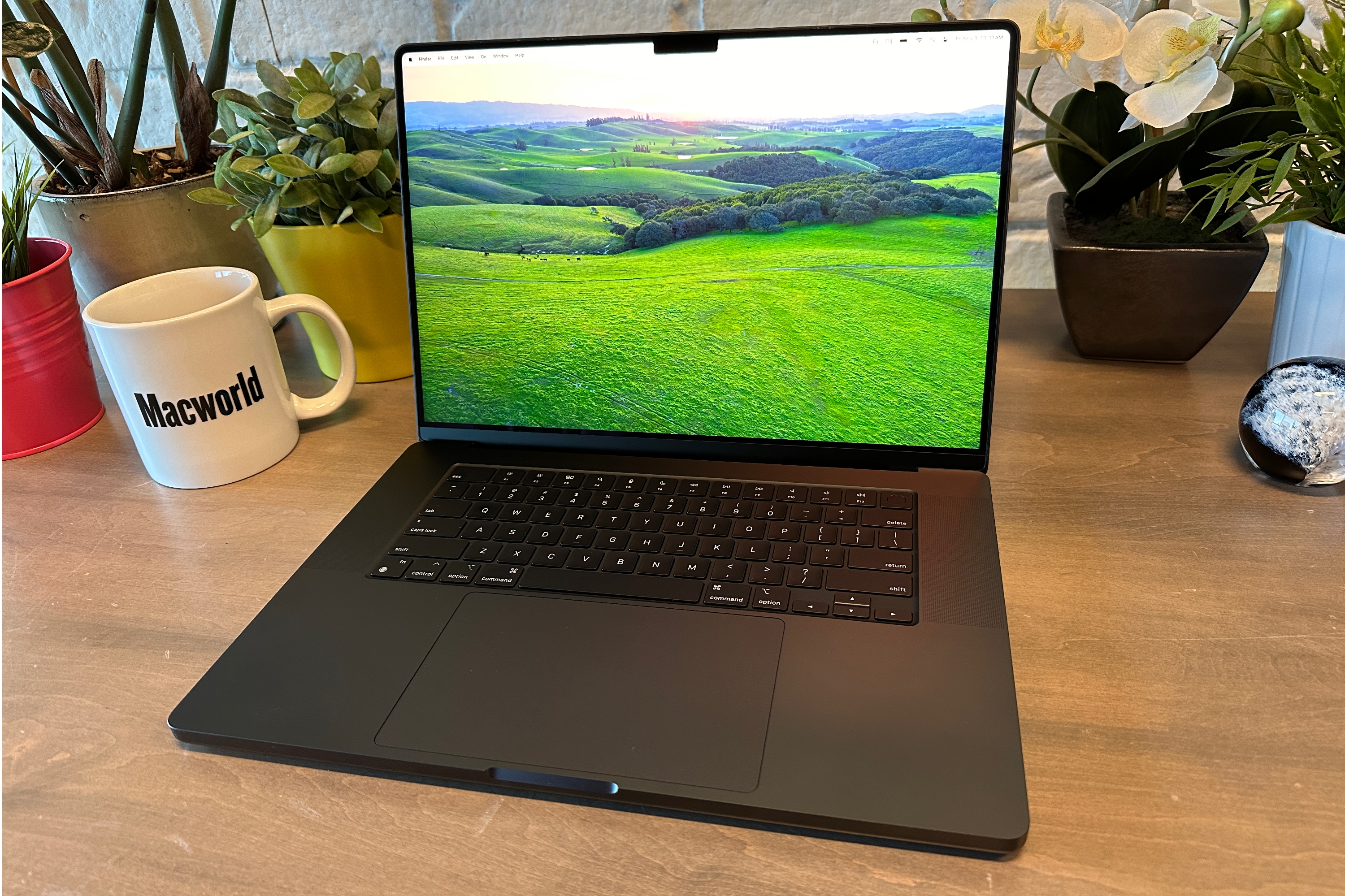
What is it? The 16-inch MacBook Pro offers a similar set of specs and configuration options as the 14-inch MacBook Pro (above), but it has a higher price, a bigger screen, and better battery life – 24 vs 22 hours.
What’s new? Like the 14-inch MacBook Pro discussed above, the 16-inch MacBook Pro features Apple’s M5 Pro or M5 Max chips, which use Apple’s Fusion Architecture to combine two 3-nm CPU and GPU dies into a single unified system on a chip. This design allows Apple to scale both performance and efficiency. The GPU also includes a Neural Accelerator in every core, which Apple says means it can deliver up to four times the AI performance of the previous generation. There is also faster memory and improved SSD speeds compared to the previous generation.
Who’s it for? This is Apple’s largest ‘pro’ laptop and it’s designed for people who need a portable Mac to do work that demands extreme processing power. You could save some money with the 14-inch MacBook Pro, but if you need a big screen on your laptop this is the Mac for you. You’ll also benefit from longer battery life. Configured with the M5 Max this is the fastest and most powerful laptop Apple has ever created.
How much does the 16-inch MacBook Pro cost? There are four standard configurations starting at $2,699/£2,699, which is $200/£200 more than the previous generation. $2,499/£2,499 for the 16-inch MacBook Pro M4 Pro with 14-core CPU, 20-core GPU and 24GB RAM, 512GB SSD. The ultimate option is a $3,999/£3,999 M4 Max with 16-core CPU, 40-core GPU, 48GB RAM and 1TB SSD. You can also add more RAM and up to 8TB SSD.
What are the specifications? Here are the standard configurations for the 16-inch MacBook Pro introduced in 2026. The screen measures 16.2in diagonally.
- Apple M5 Pro, 18-core CPU, 20-core GPU, 24GB memory, 2TB SSD, three Thunderbolt 5 ports, SDXC, HDMI, $2,699/£2,699.
- Apple M5 Max, 18-core CPU, 32-core GPU, 36GB memory, 2TB SSD, three Thunderbolt 5 ports, SDXC, HDMI, $3,899/£3,899.
- Apple M5 Max, 18-core CPU, 40-core GPU, 48GB memory, 2TB SSD, three Thunderbolt 5 ports, SDXC, HDMI, $4,399/£4,399.
- Additional options: 48GB, 64GB, or 128GB unified memory. Up to 8TB SSD, Nano-texture display.
What are display specifications?
- The 16.2-inch Liquid Retina XDR display has a native resolution of 3,456×2,234, 1,600 nits of maximum brightness, and 1,000 nits for HDR content, but it now offers 1000 nits for standard content, up from 600. You’ll also get a 1,000,000-to-1 contrast ratio and ProMotion support with a variable refresh rate of up to 120Hz.
- The notch at the top of the display conceals the 12MP Center Stage camera with support for Desk View and 1080p HD video recording. The notch does not affect the available screen area—the work area is a 16-by-10 space, while the screen surrounding the notch is considered extra space and is used to display the menu bar.
How do I connect stuff? The 16-inch MacBook Pro with M5 Pro and Max offers Wi-Fi 7 (802.11be) and Bluetooth 6 for wireless connectivity. There are three Thunderbolt/USB 4 ports that are compatible with USB-C. If you have wired devices that aren’t USB-C or are an older version of Thunderbolt, you’ll need an adapter. We have a separate MacBook Pro Thunderbolt adapter guide to help you decide which ones you’ll need. Unfortunately, be prepared to shell out a good amount of extra cash. These laptops also come with an HDMI 2.0 port for connecting an external display or projector, and an SDXC Card slot for plugging in memory cards from cameras, audio recorders, and other devices. The HDMI port supports multichannel audio output. In the U.K. and Europe Apple has stopped including a Power Adapter in the box, so you will need to buy one separately.
How fast is it? The 14-inch and 16-inch MacBook Pro models are both built for pro users – the 16-inch MacBook Pro doesn’t get any faster or more powerful options than the 14-inch model, but you will benefit from better battery life. The arrival of the M5 Pro and M5 Max chips make these the fastest Mac laptops Apple has ever made – 30% faster performance and stronger AI and graphics capabilities than the M4 generation, according to Apple (a claim we will be testing soon). When it comes to graphics prowess the Max will always beat the Pro, so if you need the fastest then you’ll want the M5 Max.
Any other considerations? Apple has increased prices for this generation of MacBook Pro, compared to the predecessors, which makes what are already high-priced Mac laptops even more expensive. While this is partly explained by the inclusion of twice as much storage (now 2TB as standard) shoppers will want to consider whether they really need the extra performance. Look out for deals on the discontinued M4 Pro and M4 Max MacBook Pro models, but note that the older models will have less storage.
Why we recommend the 16-inch MacBook Pro (M5 Pro or M5 Max): The 16-inch MacBook Pro offers the largest display and longest battery life in Apple’s laptop lineup. Its large Liquid Retina XDR display is ideal for multitasking, providing more workspace for editing timelines, coding, and using design tools.
Mac mini (M4/M4 Pro, 2024) – Best budget Mac you can buy
Best Prices Today:
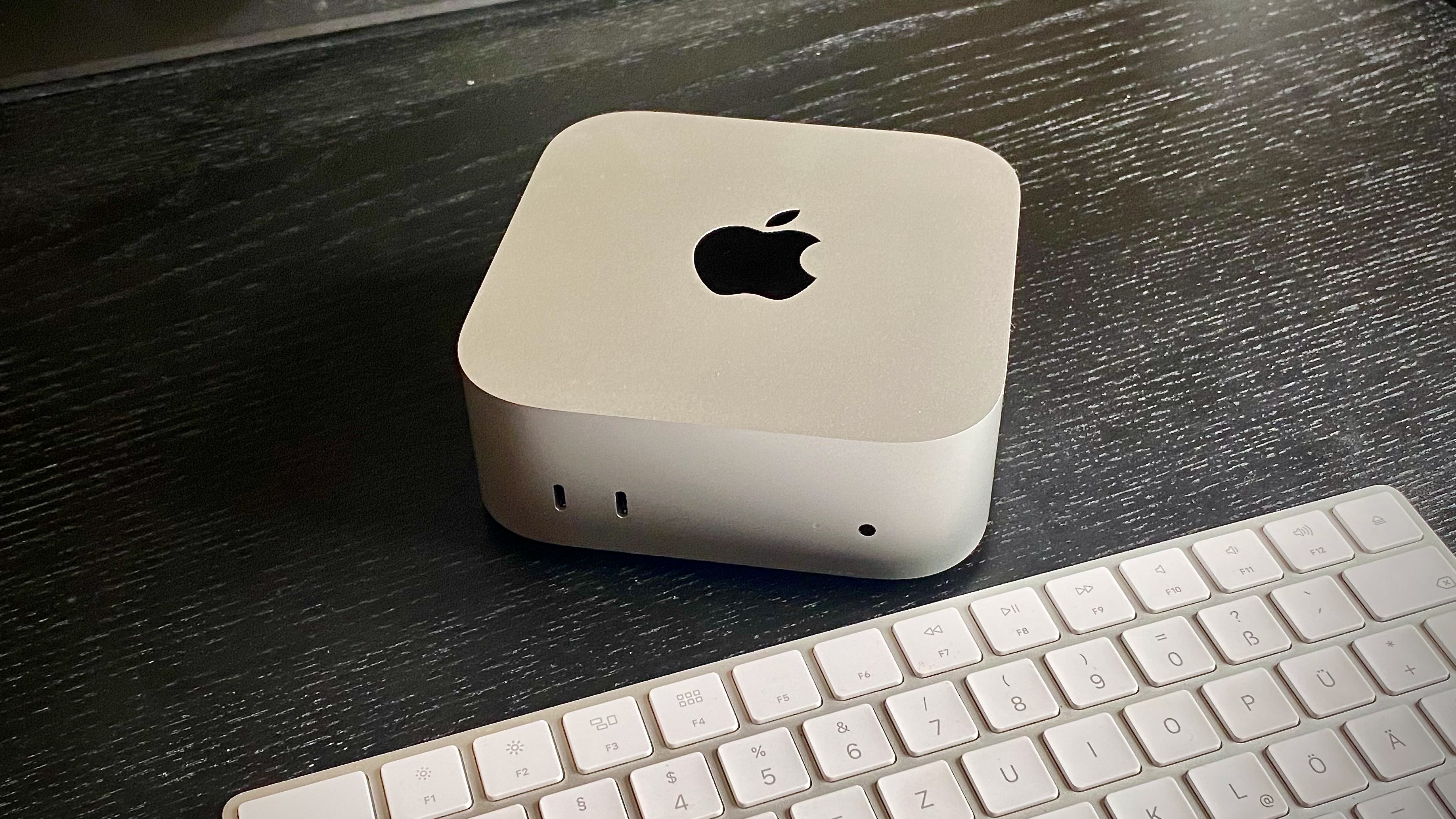
What is it? The Mac mini was already Apple’s smallest desktop Mac, but 2024’s M4 and M4 Pro models are even smaller following a redesign that means it now measures 5 inches by 5 inches, down from 7.75 inches by 7.75 inches. It offers a nice combination of speed and, at just $599/£599, affordability. It’s more than fast enough for general-purpose use, in fact, its multi-core speed is so good that if you use a professional app like a video editor, 3D software, or developer tools, the Mac mini can handle it, no problem.
What’s new? The Mac mini with M4 and a Mac mini with M4 Pro were introduced in October 2024. Along with the faster processors Apple redesigned the Mac mini, so it’s now even smaller.
Who’s it for? Because of its price and performance, the Mac mini is a great Mac for just about anybody. It makes for an ideal primary Mac for a home or small office. Professionals on a budget will be satisfied with the Mac mini. If you’re switching from a PC, you can use your PC’s keyboard and mouse with the Mac mini. The Mac mini is also ideal as a secondary Mac in your home, and it can integrate into your home entertainment center.
How much does the Mac mini cost? There are three standard configurations starting at $599/£599 for the Mac mini M4. At the top of the range is an M4 Pro Mac mini with a 12-core CPU, 16-core GPU, 24GB unified memory, and 512GB SSD which costs $1,399/£1,399. The price is about $1,000/£1,000 less for a similarly specced MacBook Pro, although, in each case, the MacBook has a bigger SSD.
What are the specifications? Apple sells three Mac mini models.
- Apple M4, 10-core CPU, 10-core GPU, 16GB memory, 256GB SSD, three Thunderbolt 4 ports, 2 USB-C, HDMI, $599/£599.
- Apple M4, 10-core CPU, 10-core GPU, 16GB memory, 512GB SSD, three Thunderbolt 4 ports, 2 USB-C, HDMI, $799/£799.
- Apple M4, 10-core CPU, 10-core GPU, 24GB memory, 512GB SSD, three Thunderbolt 4 ports, 2 USB-C, HDMI, $999/£999.
- Apple M4 Pro, 12-core CPU, 16-core GPU, 24GB memory, 512GB SSD, three Thunderbolt 5 ports, 2 USB-C, HDMI, $1,399/£1,399.
- Additional options: M4 Pro with 14-core CPU, 16-core GPU; 48GB or 64GB unified memory; up to 8TB SSD.
The Mac mini does not include a display, keyboard, or mouse, so you’ll have to provide your own, or you can customize your order to include these devices as extra-cost options.
How do I connect stuff? Like Apple’s other Macs, the Mac mini has Wi-Fi and Bluetooth. The M4-based Mac minis have three Thunderbolt 4/USB 4 ports, while the M4 Pro-based Mac mini has three Thunderbolt 5 ports. All Mac minis also offer an additional two USB-C ports, an HDMI 2.0 port, a headphone jack, and a gigabit ethernet port. They no longer offer USB-A ports. To connect a display, you can use the HDMI port or a Thunderbolt port. You might have to buy an adapter if your display doesn’t have either HDMI or a port that can connect to Thunderbolt.
How fast is it? The M4-based Mac minis are very fast, and offer the best performance-to-price ratio of any Mac that Apple offers. The Mac mini with M4 Pro offers the same 12-core CPU and 16-core GPU, 24GB memory, and 512GB storage that is found in the M4 Pro MacBook Pro for $1,399 rather than $1,999 which represented a huge saving and a great way to get a powerful Mac without spending a fortune.
Any other considerations? The Mac mini, since it doesn’t include a screen, also doesn’t feature a camera, so you will need a separate webcam for conference calls. There is also no microphone integrated. We expect that Apple will introduce a new Mac mini with M5 and M5 Pro in the first half of 2026.
Why we recommend the Mac mini (M4): The Mac mini is an excellent machine for most Mac users—new or experienced, professional or general consumer. Plus the price is excellent: if you’re on a budget, it’s a great choice, especially if you already have a spare keyboard, mouse, and display.
Read our full
M4 Pro Mac mini review
Mac Studio (M4 Max, 2025) – Best desktop Mac for creatives
Best Prices Today:
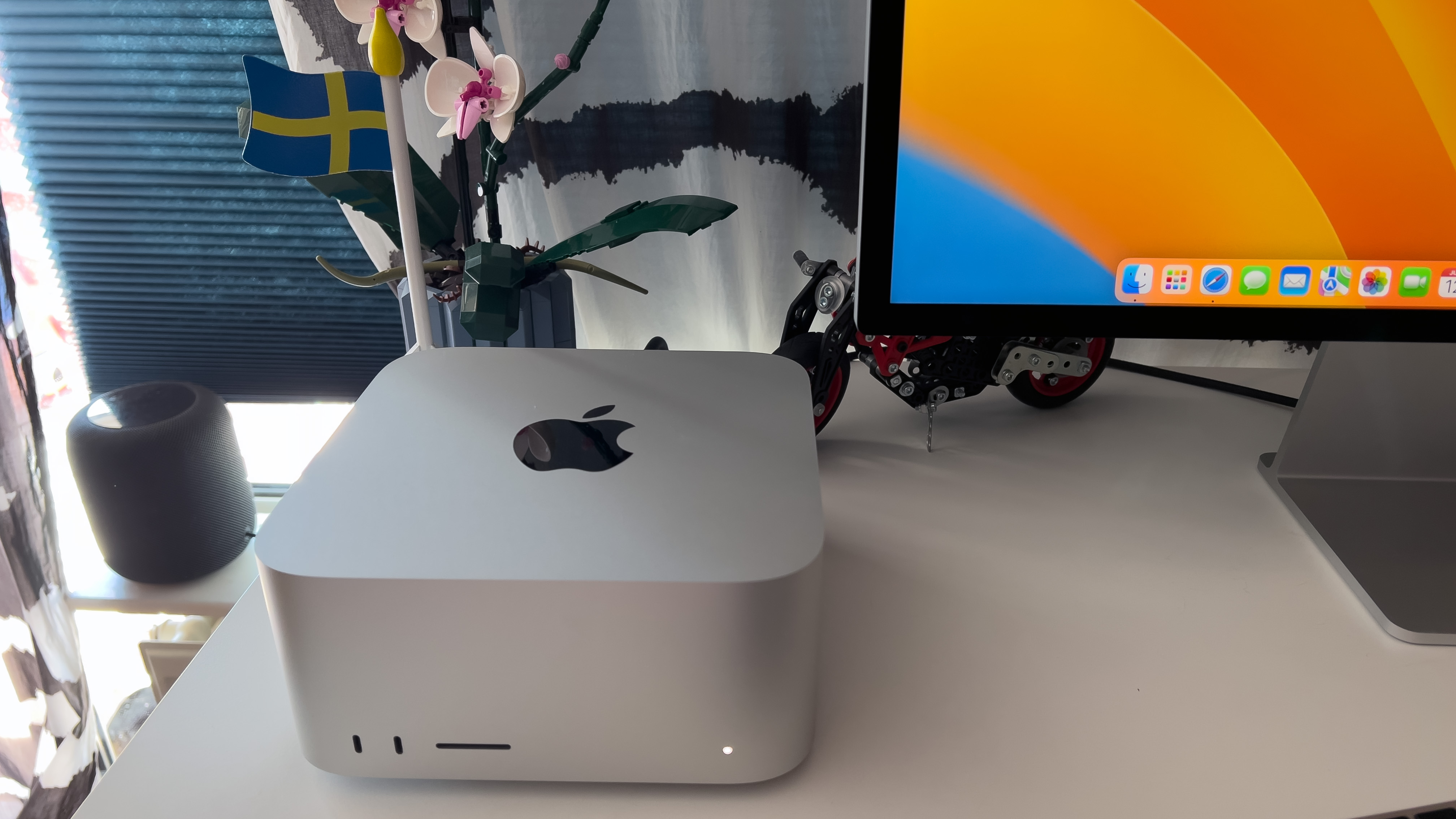
What is it? The Mac Studio is the perfect compromise, offering the ultimate in power for less money. It’s a desktop Mac that offers the workstation-quality chips of the MacBook Pro for a fraction of the price. All it lacks are the Mac Pro’s expansion options.
What’s new? In 2025 Mac Studio gained an M4 Max and M3 Ultra option. This was a leap from the M2 Max and M2 Ultra in the predecessor. There isn’t a M4 Ultra option (Apple may be reserving this for the Mac Pro).
Who’s it for? The Mac Studio with M4 Max is for the user who wants a lot of processing power in a desktop Mac for a bargain price. It is the cheapest way to get M4 Max chip – the equivalent MacBook Pro costs $3,199/£3,199, albeit with 1TB instead of 512GB storage, while the Mac Studio starts at $1,999/£1,999. That’s a huge $1,200 leap between machines, and even if you spent the extra $200 on storage you’d still have a lot of money left over.
How much does the Mac Studio cost? There are two standard configurations, an M4 Max and M3 Ultra (we’ll look at the Ultra below). Prices start at $1,999/£2,099 for the Mac Studio M4 Max with 32-core GPU and 512GB SSD. There are also build-to-order options for the M4 Max that include a 40-core GPU, up to 128GB Unified Memory, and 8TB SSD.
What are the specifications? The Mac Studio uses either the M4 Max or M3 Ultra processors. The standard configuration for the M4 Max is:
- Apple M4 Max SoC with a 14-core CPU, 32-core GPU, 36GB of memory, 16-core Neural Engine; 512GB SSD, $1,999/£2,099
- Additional options: M4 Max SoC with a 16-core CPU, 40-core GPU, up to 128GB unified memory, and up to 8TB SSD.
The memory bandwidth of the M4 Max is 546GB/s compared to 400GB/s in the M2 Max model.
How do I connect stuff? The M4 Max Mac Studio has the following ports:
- M4 Max: Four Thunderbolt 5 ports on the back; two USB-C ports on the front.
- SDXC Card slot on the front.
- Two USB-A ports.
- 10Gb ethernet.
- HDMI 2.0.
- 3.5 mm headphone jack (with advanced support for high-impedance headphones, a feature lacked by the M1-series models)
- 802.11ax Wi-Fi 6E
- Bluetooth 5.3
The Mac Studio does not include a display, keyboard, or mouse, so you’ll have to provide your own, or you can customize your order to include these devices as extra-cost options. To connect to a network, you can use the built-in ethernet port, or you can use Wi-Fi, which comes standard. To connect a display, you can use the HDMI 2.0 port or a Thunderbolt port. You might have to buy an adapter if your display doesn’t have either HDMI or a port that can connect to Thunderbolt. You can connect up to eight 4K displays, eight 6K displays or four 8K displays thanks to Thunderbolt 5 on the 2025 model.
How fast is it? The M4 Max is a fast chip and the Mac Studio with M4 Max is a powerful Mac at a very competitive price point. If you want something even faster you need to look to the Mac Studio with M3 Ultra (below).
Any other considerations? The main disadvantage is that the Mac Studio relies on external connections for expandability. If you want a pro-level Mac with the ability to swap expansion cards you should look at Apple silicon-based Mac Pro below. We expect that Apple will introduce a new Mac Studio with M5 Max and M5 Ultra in of 2026.
Why we recommend the Mac Studio (M4 Max): The Mac Studio is ideal for users who use processor- and graphics-intensive apps, such as media production, software development, graphics software, and more. If you find yourself spending a lot of time watching progress bars while you work, you’ll benefit from the power of the Mac Studio. Read: Why Mac professionals should switch to a Mac Studio. The Mac Studio is the perfect compromise, offering the ultimate in power for less money. It’s a desktop Mac that offers the workstation-quality chips of the MacBook Pro for a fraction of the price. It’s more powerful (and more expensive) than the Mac mini, but lacks the Mac Pro’s expansion options.
Read our full
Apple Mac Studio (M4 Max, 2025) review
Apple 24-inch iMac (M4, 2024) – Best for receptions and living rooms
Best Prices Today:
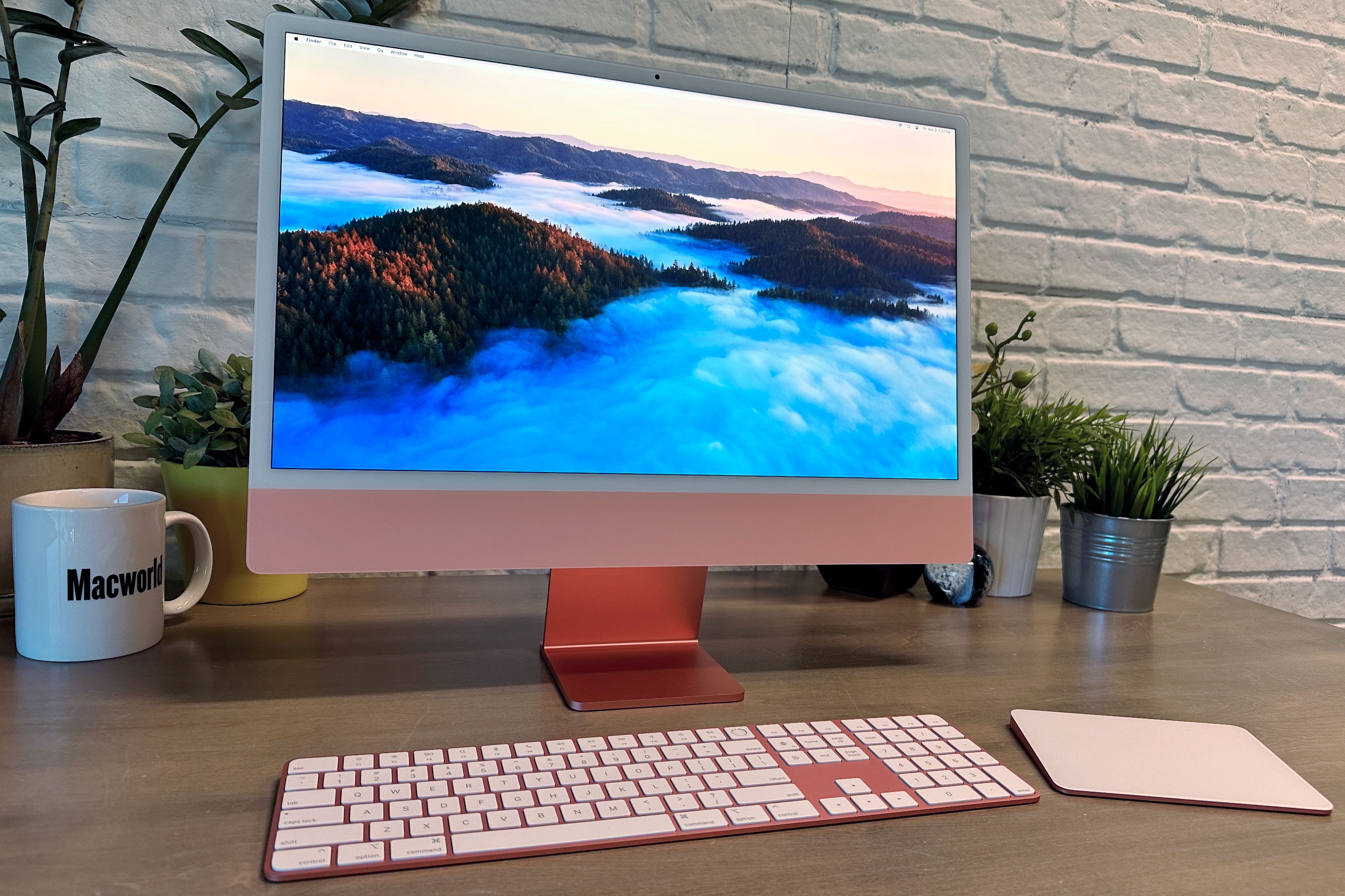
What is it? The iMac is what Apple is famous for, although the current design is as far removed from the original as you. can get. It’s the Mac to have in a living room or an office reception – somewhere you can show it off.
What’s new? In October 2024 Apple introduced the M4 version of the 24-inch iMac. Little has changed since the redesign of 2021, which represented the first major update in more than a decade, with a cleaner design and a choice of seven bright colors (slightly lighter shades for 2024).
Who’s it for? The iMac is great for both novices and demanding users. It can handle general-purpose and heavy-duty tasks equally well, although those after a replacement for a 27-inch IMac or iMac Pro might want to wait to see if the rumored iMac Pro ever materializes, or settle for a Mac mini Pro (above) or Mac Studio (below). It’s ideal for someone who needs to buy a complete computer setup (keyboard, mouse or trackpad, and display) and wants to maximize workspace efficiency. The 24-inch iMac is a design icon that will look great in any office.
How much does the iMac cost? When the M4 iMac Apple dropped prices outside the U.S. The three standard configurations start at $1,299/£1,299 for the entry-level model, $1,499/£1,499 for the mid-range, and $1,699/£1,699 for the top of the range.
What are the specifications? The 24-inch iMac uses Apple’s M4 chip, the same M4 that features in the 14-inch MacBook Pro, but in each case, there is half the storage and the price is $100 less. There are several configurations available as well as build-to-order options:
- Apple M4, 8-core CPU, 8-core GPU, 16GB memory, 256GB SSD, two Thunderbolt 4 ports, $1,299/£1,299.
- Apple M4, 10-core CPU, 10-core GPU, 16GB memory, 256GB SSD, four Thunderbolt 4 ports, $1,499/£1,499.
- Apple M4, 10-core CPU, 10-core GPU, 16GB memory, 512GB SSD, four Thunderbolt 4 ports, $1,699/£1,699.
- Apple M4, 10-core CPU, 10-core GPU, 24GB memory, 512GB SSD, four Thunderbolt 4 ports, $1,899/£1,899.
- Additional options: 32GB memory; up to 2TB storage
What are the display specifications? The 24-inch 4.5K Retina display has 11.3 million pixels and supports the P3 wide color gamut, over a billion colors, 500 nits of brightness, and True Tone. Apple treats the display with an anti-reflective coating to help with readability. The display hasn’t changed since the M1 model launched.
How do I connect stuff? The $1,299 24-inch iMac 24 has two Thunderbolt 4 ports that also work with USB-C devices. The $1,499 and $1,699 iMacs have four Thunderbolt 4 ports (the previous generation had two Thunderbolt/USB 4 and two USB 3 ports). If you have a USB-A device, you need to buy an adapter, such as Apple’s ($19 / £19). If you have multiple USB-A devices and other items, consider a Thunderbolt hub. The 24-inch iMac also has a headphone jack on the side.
Wi-Fi 6E and Bluetooth 5.3 are built-in. Apple doesn’t put a gigabit ethernet port on the 24-inch iMac—instead, it’s on the power adapter. But that ethernet-equipped power adapter comes standard with the $1,499 and $1,699 models. It’s not included with the $1,299 model, but you can select it as an option at the point of purchase—and yes, that means you’ll have to pay extra for it.
How fast is it?: Since the 24-inch iMac has the same M4 as the entry-level 14-inch MacBook Pro, its speed is very similar. That means it’s fast. It’s got all the speed general consumers need, and it can handle pro applications with no problem. However, the $1,299 model has only one fan inside its body, while the $1,499 and $1,699 models have two fans. That means the high-priced models do a better job of keeping the internals cool. The $1,299 model may need to slow down its performance on heavy-duty tasks in order to maintain a proper temperature.
Any other considerations? We feel that the iMac price is high compared to the specs on offer, but we do admire the design. We are holding out for a bigger screen. We expect that Apple will introduce a new M5 iMac in of 2026.
Why we recommend the iMac (M4): The iMac was greatly improved when Apple introduced the 24-inch model back in 2021, from the design to the display to its performance. But, we hope rumors that Apple may launch an iMac Pro model are true. If you are buying one the sweet spot is the $1,499/£1,499 model, which gets you more ports, Touch ID, and ethernet.
Read our full
Apple iMac (M4, 2024) review
Mac Studio (M3 Ultra, 2025) – The ultimate desktop Mac right now
Best Prices Today:
What is it? There is a configuration of Mac Studio that, like the Mac Pro, runs on Apple’s Ultra chips. The Ultra chip combines four of the standard M-series chips on one die for a super fast and ultra powerful system. Note that the Mac Studio features an M3 Ultra, not an M4 Ultra, and the M3 Ultra is faster and more powerful than the M4 Max.
What’s new? In March 2025 Apple updated the Mac Studio to run on an M3 Ultra chip. The surprising thing about this is that Apple didn’t jump straight to the M4 Ultra. No doubt Apple has a reason to choose to sell an M3 Ultra Mac Studio rather than an M4 Ultra Mac Studio (probably it doesn’t want it to overshadow the Mac Pro when that model gets the M4 Ultra). The M3 Ultra is the fastest Mac processor Apple makes (until the M4 Ultra arrives at least).
Who’s it for? The Mac Studio with M3 Ultra is for the user who wants the maximum processing power. It lacks the expansion options of the Mac Pro, but it brings all the power usually reserved for the ultimate Mac in a smaller and cheaper package.
How much does the Mac Studio cost? The Mac Studio M3 Ultra with 28-core CPU, 60-core GPU, 32-Core Neural Engine and 1TB SSD costs $3,999/£4,199. There are also build-to-order options that include a 32-core CPU, 80-core GPU, up to 512GB Unified Memory, and 16TB SSD. Fully maxed out a Mac Studio would cost $14,099/£14,299.
What are the specifications? The Mac Studio with Me Ultra processors offers these specs:
- Apple M3 Ultra SoC with a 28-core CPU, 60-core GPU, 64GB of memory, and a 32-core Neural Engine; 1TB SSD, $3,999/£4,199
- Additional options: M3 Ultra SoC with a 32-core CPU, 80-core GPU, up to 512GB unified memory, and up to 16TB SSD.
The memory bandwidth of the M3 Ultra is 819GB/s compared to 800GB/s in the M2 Ultra model.
The Mac Studio does not include a display, keyboard, or mouse, so you’ll have to provide your own, or you can customize your order to include these devices as extra-cost options.
How do I connect stuff? The Mac Studio has the following ports:
- M2 Ultra: Six Thunderbolt 5 ports.
- SDXC Card slot on the front.
- Two USB-A ports.
- 10Gb ethernet.
- HDMI 2.0.
- 3.5 mm headphone jack
- 802.11ax Wi-Fi 6E
- Bluetooth 5.3
To connect to a network, you can use the built-in ethernet port, or you can use Wi-Fi, which comes standard.
To connect a display, you can use the HDMI 2.0 port or a Thunderbolt port. You might have to buy an adapter if your display doesn’t have either HDMI or a port that can connect to Thunderbolt. You can connect up to eight 4K displays, eight 6K displays, or four 8K displays to the M2 Ultra.
How fast is it? The M3 Ultra Mac Studio is the fastest Mac Apple sells as of March 2025 and it does so at a very competitive price point. However, when the M4 Ultra arrives in the Mac Pro that will take the lead. We’ll be testing the M3 Ultra as soon as we can get our hands on the new Mac Studio.
Any other considerations? Sharing the same chip as the Mac Pro made the Mac Studio the obvious choice for anyone who wanted a powerful Mac without having to remortgage their house. Now that the Mac Studio runs on an M3 Ultra while the Mac Pro still only offers the M2 Ultra (for now) the Mac Studio is the fastest ever Mac. Those who might have chosen the Mac Pro may opt instead for the Mac Studio, it’s one disadvantage being that it lacks the Mac Pro’s expansion options. We expect that Apple will introduce a new Mac Studio with M5 Max and M5 Ultra in of 2026.
Why we recommend the Mac Studio M3 Ultra: The Mac Studio with M3 Ultra is ideal for users who use processor- and graphics-intensive apps, such as media production, software development, graphics software, and more. If you find yourself spending a lot of time watching progress bars while you work, you’ll benefit from the power of the Mac Studio.
The only reason not to buy is if you want to wait to see what the Mac Pro with M4 Ultra offers, when, if ever, Apple launches it.
Apple Mac Pro (M2 Ultra, 2023) – The monster Mac
Best Prices Today:
Note: This model hasn’t been updated since 2023. An update is expected at some time in 2025. See: M4 Ultra Mac Pro rumors.
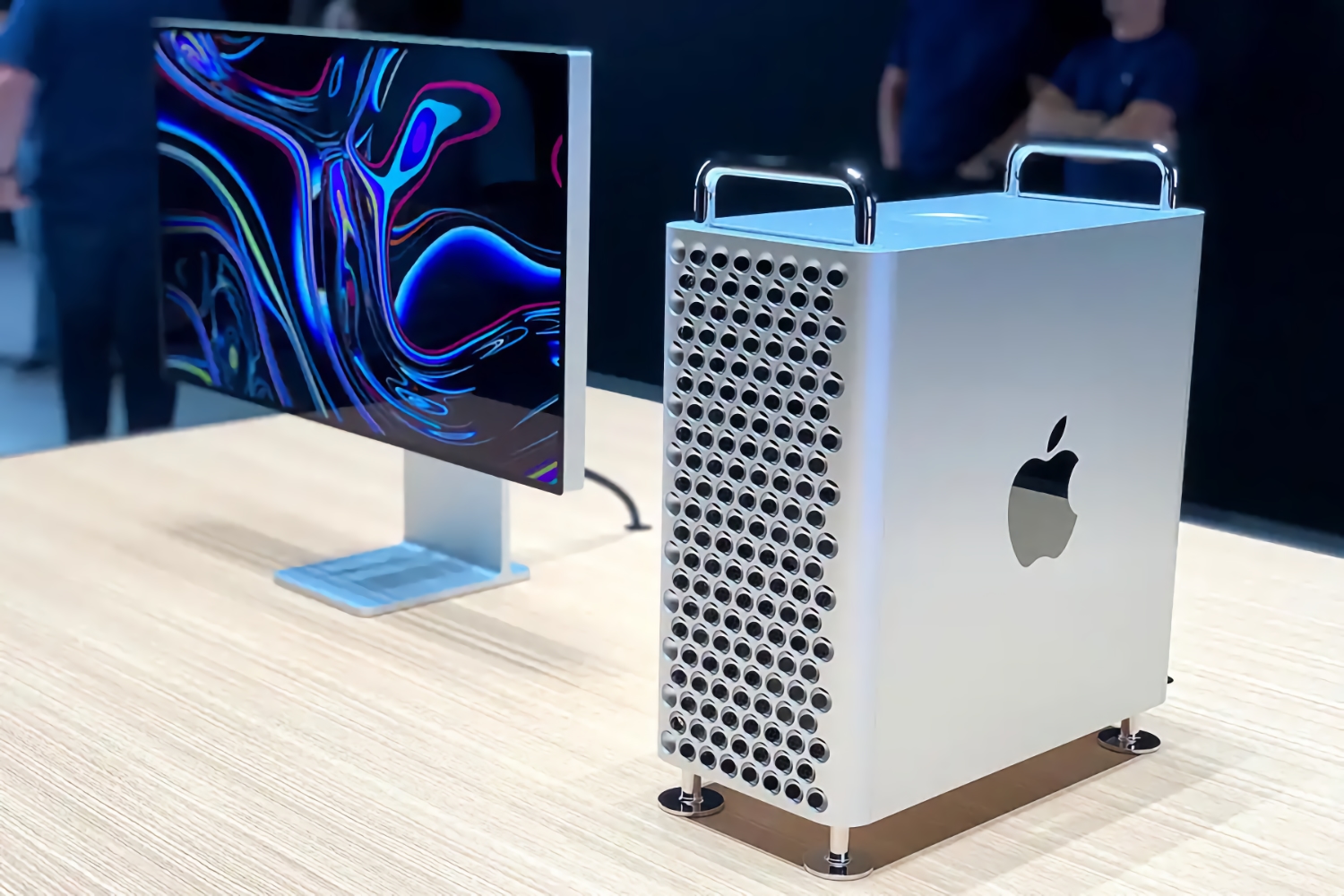
What is it? The Mac Pro is Apple’s workstation. It’s designed for professionals who need a powerful and flexible machine. Apple took its time to update the Mac Pro with its own silicon, but in June 2023, three and a half years after the previous update, the company finally came up with the goods. We are now waiting for Apple up update it from the M2 Ultra to the M4 Ultra.
Who’s it for? The Mac Pro is designed for professionals who work with applications that use as many processing cores as possible—video-editing applications, image-editing software, 3D programs, audio editing, software developers, and the like.
How much does the Mac Pro cost? The Mac Pro starts at $6,999/£7,199 (which is up from the previous generation’s starting price of $5,999/£5,499). That’s for the Tower version, there is also a Rack mount version that starts at $7,499/£7,699. Those are the starting prices, you can choose various configuration options, such as the 76-core GPU and the 192GB unified memory and 8TB storage – just as with the Mac Studio. A fully specced out Mac Pro Tower costs $11,799/£11,999.
What are the specifications? The specifications on offer are identical to the Mac Studio with M2 Ultra:
- Apple M2 Ultra SoC with a 24-core CPU, 60-core GPU, 64GB of memory, and a 32-core Neural Engine; 1TB SSD
- Additional options: M2 Ultra SoC with a 76-core GPU, up to 192GB unified memory, and up to 8TB SSD.
How do I connect stuff? Mac Pro has the following ports:
- Six Thunderbolt 4 ports on the back; two USB-C ports on the top.
- Two USB-A ports.
- 10Gb ethernet.
- HDMI 2.0.
- 3.5 mm headphone jack (with advanced support for high-impedance headphones, a feature lacked by the M1-series models)
- Wi-Fi 6E (802.11ax)
- Bluetooth 5.3
To connect a display, you can use the HDMI 2.0 port or the Thunderbolt ports. You might have to buy an adapter if your display doesn’t have either HDMI or a port that can connect to Thunderbolt. You can connect up to eight 4K displays, six 6K displays, or three 8K displays.
To connect external devices, the Mac Pro has six Thunderbolt 4/USB-C ports, two USB-A ports, two HDMI ports, and dual 10Gb Ethernet. But the real draw for creative pros will be the seven full-length PCI Express gen 4 slots, one of which comes with an Apple I/O card installed.
How fast is it? When it announced the model, Apple said the 2023 Mac Pro was up to 3x faster than the previous-generation Intel-based model. It was impressive at the time, but the M2 Ultra has been superceeded by the M4 Max in our tests, and now that Apple has updated the Mac Studio with the M3 Ultra you can expect even better performance from that model, which has the benefit of costing much less.
Apple says the M2 Ultra Mac Pro can plan an “unprecedented 22 streams of 8K ProRes video.” Just imagine what the new Mac Pro M4 Ultra will be capable of.
Macworld’s buying advice: The Mac Pro provides the processing power that the most demanding users need. We’re talking about production environments, like TV and audio recording studios, animation houses, and software developers. If you feel like you can never have enough power, you’re probably the professional the Mac Pro is aimed at. But if you don’t need the expandability then the Mac Studio will probably be adequate.
If you’re more of a “prosumer” than a professional—someone who is an expert Mac user, but doesn’t use high-end apps—the Mac Pro is overkill. You’re probably not going to be able to take advantage of what the Mac Pro has to offer.
Our recommendation is to wait until June 2026 for the long overdue M5 model.
For buying advice on the best Windows laptops, see our sister site PCWorld.
FAQ
What’s best, MacBook Air or MacBook Pro?
We address this question in detail in our comparison of the MacBook Air vs Pro. It’s really a question of price versus power. The Air is sufficient for most people’s needs, the Pro will give you that extra boost in terms of what the Mac is capable of.
Buying an entry-level MacBook Air for $1,099/£1,099 will get you an excellent Mac laptop for less than a grand. If you want to spend less than that you may be able to find a discounted MacBook Air – we round up the best MacBook Air deals regularly.
If you want a larger screen, the 15-inch MacBook Air is a great option that is a lot cheaper than the smaller 14-inch MacBook Pro.
The price of the Pro and Max MacBook Pro models is high, but these models offer the kind of specs professional users, especially creatives, need, including support for more RAM, and more CPU and GPU cores. If you can afford to stretch to the Max you will get the ultimate Mac without a doubt, but you need to be willing to make a significant investment.
The choice between the 14-inch and 16-inch MacBook Pro is all down to the screen size. The 16-inch models are more expensive, but once you spec them out in such a way to be comparable the price difference is minor. The bigger difference is between the Pro and Max processors. Other than speed, MacBooks with Max processors can connect up to four external displays (three over Thunderbolt and one over HDMI), while since the M4 all models allow two external displays in addition to the laptop screen. (There are workarounds if you need to connect more screens).
There is now another Mac laptop to consider, the MacBook Neo lowers the price of ownership of a Mac laptop to $599/£599. If budget really is tight though, you might want to consider a discounted previous generation MacBook Air instead.
Should I upgrade from my Intel Mac?
Yes. It’s time! We are now more than five years into Apple’s transition from Intel processors to its own silicon that includes CPU, GPU, and unified memory. The transition began with the introduction of the M1 in November 2020. Since June 2023 every Mac Apple sells uses Apple’s own chips rather than Intel processors.
If you’ve yet to upgrade your Intel Mac to one powered by Apple’s silicon what are you waiting for? If you are concerned that a must-have app doesn’t run on an M-series Mac, consider finding a new app because the performance gains are tremendous.
Another good reason to update your Intel Mac is that Intel chips will not be supported by Apple for much longer in terms of security updates. With the arrival of macOS Tahoe, the number of supported Intel Macs is fewer than ever, and Apple has confirmed that the next version of macOS will not support any Intel powered Macs. This doesn’t mean that in fall 2026 Intel Macs will be out in the cold, because Apple continues to support older versions of macOS with security updates for a couple more years, but with only a few of the most recent Intel Macs supported by 2024’s Sequoia the days of Intel Macs are certainly numbered. Read: The Intel Macs that can run macOS Sequoia.
Where can I get the best price for a new Mac?
If you’re simply looking for a great offer, visit our MacBook Pro deals, MacBook Air deals, iMac deals, Mac Studio deals, and Mac mini deals pages which are regularly updated.
What specs do I really need for my Mac?
Chip: The specs necessary for you depend on what you need the Mac for. If you do the usual everyday tasks and work, which includes web browsing, light productivity apps, then an M3, M4 or M5 chip will probably suffice. If you are working with complex Excel spreadsheets or multi-layer images, using Photoshop or other graphics apps, producing video or audio, or serious gaming then look at the Pro versions of the chips. Those who make a living as a media producer, software developer or anything that requires multitasking should consider the Max (or possibly Ultra) version of the M-series of chips.
GPU: One key difference between the chips is the number of GPU cores, and the number of GPU cores you require goes in tandem with the outline above, with the Ultra having the most GPU cores, then the Max and so on. For example, the Pro chips provide the required GPUs for those doing moderate to serious media production and gaming, while the Max is for professional-level media production and hard-core gaming.
RAM: When it comes to RAM, in 2024 Apple dropped the standard 8GB RAM (aka Unified Memory) from the line up, so now all Macs (aside from the MacBook Neo) come with 16GB or more, which with the arrival of AI is really necessary. Should you upgrade beyond 16GB RAM? If you can we recommend it. 24GB or 32GB is a good amount for moderate media production, graphic work, podcasting, and gaming. Any more than 32GB is for professional-level graphics and media production, software development, hardcore gaming.
Storage: Even with the opportunity to store music, photos and more in the cloud, if seems you can never have enough storage inside your Mac. Trying to decide how much to get? For typical work 256GB will probably be enough, but if you are using media production apps like iMovie we’d recommend 512GB and for another in professional media production 1TB or more is advised.
For more information to help you decide which Mac to buy see our Mac processor comparison where we compare Apple silicon and Intel. We also offer advice about how much storage, RAM, and cores in How much MacBook RAM, SSD, GPU, and CPU do you really need.
When were the Macs last updated?
The MacBook Pro and MacBook Air were updated, and the MacBook Neo was introduced, in March 2026. The Mac mini hasn’t been updated since October 2024 and March 2025 was the most recent Mac Studio update. The only Mac that hasn’t been updated in the past couple of years is the Mac Pro.
Why you can trust Macworld’s advice
Macworld has been covering everything Apple related since our first issue which arrived alongside the original Mac in 1984. Nobody knows Apple better, except probably Apple, but the difference is that we are completely impartial. We are made up of a team of experts with decades of experiences with Macs and other Apple products, and between us we have reviewed every Apple product meaning we are uniquely positioned to provide buying advice.