Apple Silicon on the Mac has been excellent, but there’s one major drawback: Windows can’t run natively. That’s why many users still use Intel Macs.
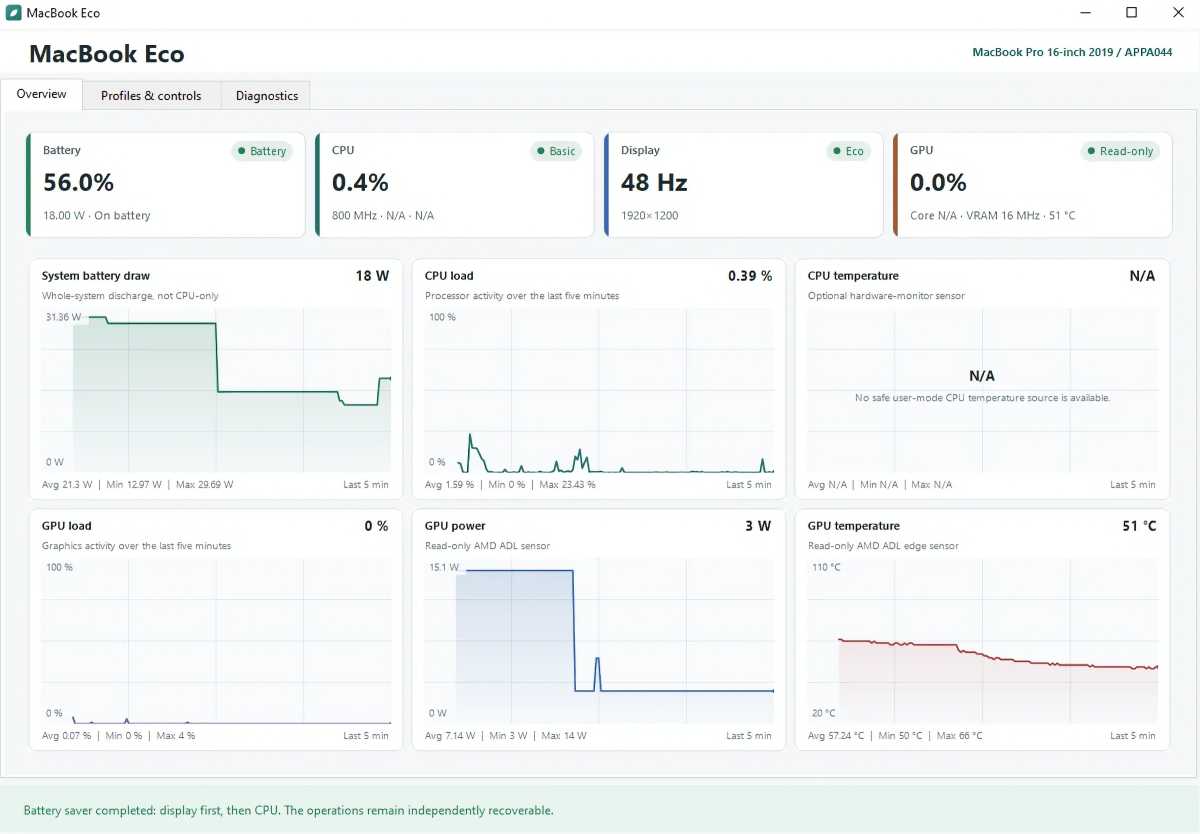
On Reddit, a user who goes by stlk0 runs Windows on an Intel MacBook Pro and didn’t like how the laptop got hot “even when almost nothing was running,” and that the battery life was worse. So he investigated and discovered that if the Radeon Pro 5300M graphics card in their 2019 16-inch MacBook Pro was adjusted to run the display at 48Hz instead of 60Hz, the laptop didn’t get as hot or draw as much power.
After the adjustment, “GPU power dropped from 14W to 3W, and the temperature gradually fell from 66°C to around 51°C,” wrote stlk0. “The laptop became cooler and quieter, and battery drain was noticeably lower.”
To help others with the same problem, Stlk0 created a free and open-source Windows utility called MacBookEco. The app lets you switch between 49Hz and 60Hz for the display. It also includes other CPU power presets. MacBookEco is available on GitHub.
Intel Macs are pretty old by now. The last Intel-series MacBook Pro was released in 2020. As time goes by, the amount of charge the MacBook battery can hold diminishes. Since Boot Camp is dead on M-series Macs, users who need to run Windows natively will do what they can to get the most out of their Intel Macs. Running hot harms the battery, so this utility could be a lifesaver for some users.