Unsure which version of iOS your iPhone can run? Here’s a quick guide so you can find out if your iPhone is compatible with the most recent iterations of the iPhone operating system, and, if it isn’t, which version you can install on your iPhone.
iPhone iOS Compatibility: At a Glance
Find your iPhone in our iPhone iOS support table and see which version of iOS you can run.
| Which iPhone do you have? | Which version of iOS can you run? |
|---|---|
| iPhone 17e 2026 | iOS 26 |
| iPhone 17 Pro (Max) 2025 | iOS 26 |
| iPhone Air 2025 | iOS 26 |
| iPhone 17 2025 | iOS 26 |
| iPhone 16e 2025 | iOS 26 |
| iPhone 16 Pro (Max) 2024 | iOS 26 |
| iPhone 16 (Plus) 2024 | iOS 26 |
| iPhone 15 Pro (Max) 2023 | iOS 26 |
| iPhone 15 (Plus) 2023 | iOS 26 |
| iPhone 14 Pro (Max) 2022 | iOS 26 |
| iPhone 14 (Plus) 2022 | iOS 26 |
| iPhone SE (3rd gen) 2022 | iOS 26 |
| iPhone 13 Pro (Max) 2021 | iOS 26 |
| iPhone 13 (mini) 2021 | iOS 26 |
| iPhone 12 Pro (Max) 2020 | iOS 26 |
| iPhone 12 (mini) 2020 | iOS 26 |
| iPhone SE (2nd gen) 2020 | iOS 26 |
| iPhone 11 Pro (Max) 2019 | iOS 26 |
| iPhone 11 2019 | iOS 26 |
| iPhone XR 2018 | iOS 18 |
| iPhone XS (Max) 2018 | iOS 18 |
| iPhone X 2017 | iOS 16 |
| iPhone 8 (Plus) 2017 | iOS 16 |
| iPhone 7 (Plus) 2016 | iOS 15 |
| iPhone SE (1st gen) 2016 | iOS 15 |
| iPhone 6s (Plus) 2015 | iOS 15 |
Is your iPhone still supported by Apple?
- If your iPhone runs iOS 15 or newer, it is still receiving security updates and is safe to use
The latest version of the iPhone operating system is iOS 26, which will continue to receive new features until the next major release, iOS 27, launches in the fall of 2026.
Even if your iPhone can’t run the latest version of iOS, it is safe to use as long as it continues to receive security updates. Apple often releases security updates for older iOS versions to patch flaws that are being exploited.
For example, in March 2026 the “DarkSword” hacking toolkit was identified as targeting iPhones running older versions of iOS 18. The security holes used by the DarkSword malware were addressed in the iOS 18.7.6 update.
If you use an iPhone running a version of iOS that Apple doesn’t support with security updates, you are at risk of exploitation attacks targeting flaws in older software versions.
Some updates may also be necessary to maintain certificates needed for essential services like iMessage, FaceTime, and device activation, so if you aren’t running a supported version of iOS you may find these features stop working.
The good news is that all of the iPhone models listed in the table above are currently supported by Apple, although the level of support varies.
Apple continues to provide security updates for the following older versions of iOS:
- iOS 15 and iOS 16 received updates to address security vulnerabilities in March 2026
- iOS 18 received a critical security update in March 2026
Apple doesn’t need to update iOS 17, because every iPhone that runs it can upgrade to a newer version.
This means that, for now at least, the following older iPhones are still receiving security updates:
- iPhone X
- iPhone 8
- iPhone 7
- iPhone SE (1st generation)
- iPhone 6s – the oldest supported iPhone
We don’t know how much longer Apple will continue to support iOS 15 and iOS 16 — and these iPhones. As we explain in How long Apple supports iPhones for, the company has already classified the iPhone SE (1st generation) as obsolete, while the iPhone 6s, iPhone 7, iPhone 8 and iPhone X are on Apple’s vintage list. These classifications mean it may no longer be possible to get these devices repaired through Apple.
Should I upgrade my iPhone?
IDG
If your iPhone can’t run the newest version of iOS, that doesn’t necessarily mean you need to upgrade. While you won’t get the latest features, Apple continues to issue software updates to address security vulnerabilities in recent versions of iOS. Even with the arrival of iOS 26, Apple has continued to support iOS 18, iOS 16 and iOS 15 with security updates – and, with those versions of iOS, 2015’s iPhone 6s through to 2018’s iPhone XR and iPhone XS.
However, if you’re using an older iPhone, security is the key concern. Apple is still providing security patches for older devices via iOS 15 and iOS 16, but this support is unlikely to last much longer.
By contrast, iOS 18 support is expected to continue for several more years, extending the usable life of the iPhone XS and XR.
Once your device can no longer run a supported version of iOS, it’s time to seriously consider upgrading. We explain how long Apple supports the iPhone for in a separate article, and you can see full iOS compatibility in the chart above.
As a general rule, any iPhone that can’t run iOS 26 is nearing the end of its practical lifespan.
Even among iPhones that do support iOS 26, some upgrades are worth considering. In particular, newer models support Apple Intelligence features that aren’t available on older devices.
If you own one of the following iPhones, upgrading will give you access to significantly improved performance and newer features — especially if you’re moving to a recent model such as the iPhone 17:
- iPhone 15 & 15 Plus (2023)
- iPhone 14 Pro & 14 Pro Max (2022)
- iPhone 14 & 14 Plus (2022)
- iPhone SE (3rd generation, 2022)
- iPhone 13 Pro & 13 Pro Max (2021)
- iPhone 13 mini (2021)
- iPhone 12 Pro & 12 Pro Max (2020)
- iPhone 12 & 12 mini (2020)
- iPhone SE (2nd generation, 2020)
- iPhone 11 Pro & 11 Pro Max (2019)
- iPhone 11 (2019)
Every iOS version supported by each iPhone
To show you which versions of iOS your iPhone can run, we’ve broken down each iPhone generation in the chart below, so you can see which version it originally shipped with (as that will be the earliest it can run) and the latest iteration it currently supports – including whether that iPhone supports iOS 26. Take a look at our guide to Every version of iOS released so far for more information about the different versions of iOS.
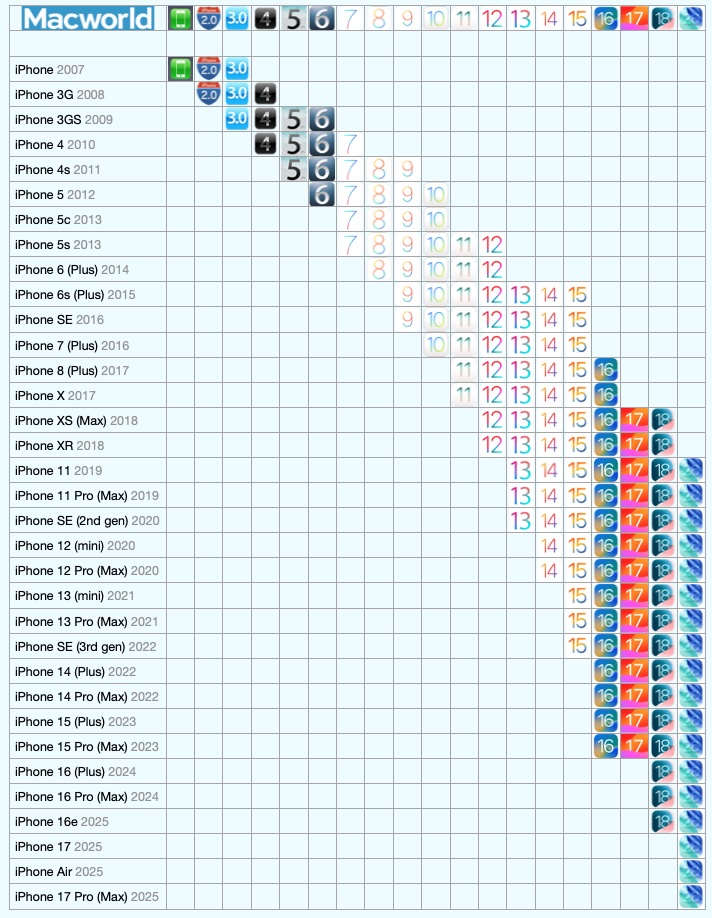
Every version of iOS and the phones it supports.
Foundry
iPhone Air
- Original iOS version: iOS 26
- Does it run iOS 26: Yes
iPhone 17, 17e, 17 Pro, 17 Pro Max
- Original iOS version: iOS 26
- Does it run iOS 26: Yes
iPhone 16, 16e, 16 Plus, 16 Pro, 16 Pro Max
- Original iOS version: iOS 18
- Does it run iOS 26: Yes
iPhone 15, 15 Plus, 15 Pro, 15 Pro Max
- Original iOS version: iOS 17
- Does it run iOS 26: Yes
iPhone 14, 14 Plus, 14 Pro, 14 Pro Max
- Original iOS version: iOS 16
- Does it run iOS 26: Yes
iPhone 13, 13 mini, 13 Pro, 13 Pro Max
- Original iOS version: iOS 15
- Does it run iOS 26: Yes
iPhone SE (3rd generation)
- Original iOS version: iOS 15
- Does it run iOS 26: Yes
iPhone 12, 12 mini, 12 Pro, 12 Pro Max
- Original iOS version: iOS 14
- Does it run iOS 18: Yes
iPhone 11, 11 Pro, 11 Pro Max
- Original iOS version: iOS 13
- Does it run iOS 26: Yes
iPhone SE (2nd generation)
- Original iOS version: iOS 13
- Does it run iOS 26: Yes
iPhone XR, XS, XS Max
- Original iOS version: iOS 12
- Does it run iOS 26: No
- Last compatible version: iOS 18
iPhone X
- Original iOS version: iOS 11
- Last compatible version: iOS 16
iPhone 8, 8 Plus
- Original iOS version: iOS 11
- Last compatible version: iOS 16
iPhone 7, 7 Plus
- Original iOS version: iOS 10
- Last compatible version: iOS 15
iPhone 6S, 6S Plus
- Original iOS version: iOS 9
- Last compatible version: iOS 15
iPhone SE (1st generation)
- Original iOS version: iOS 9
- Last compatible version: iOS 15
iPhone 6, 6 Plus
- Original iOS version: iOS 8
- Last compatible version: iOS 12
iPhone 5S
- Original iOS version: iOS 7
- Last compatible version: iOS 12
iPhone 5C
- Original iOS version: iOS 7
- Last compatible version: iOS 10
iPhone 5
- Original iOS version: iOS 6
- Last compatible version: iOS 10
iPhone 4s
- Original iOS version: iOS 5
- Last compatible version: iOS 9
iPhone 4
- Original iOS version: iOS 4
- Last compatible version: iOS 7
iPhone 3GS
- Original iOS version: iOS 3
- Last compatible version: iOS 6
iPhone 3G
- Original iOS version: iOS 2
- Last compatible version: iOS 4
iPhone
- Original iOS version: iOS 1
- Last compatible version: iOS 3
If your iPhone isn’t supported by iOS 24 or 18 then you might want to consider upgrading to a newer device. Take a look at our best iPhone deals round-up where we share the most recent money-saving deals. Read our best iPhone guide for advice.
How to see which version of iOS you’re running
If you’re not sure which version of iOS you’re currently running, it’s very easy to find out.
- Open Settings.
- Tap on General.
- Tap About and look for the iOS Version number.

How to see which version of iOS is installed
Foundry
How to upgrade iOS
Now that you know the latest version of iOS that your iPhone supports, it’s a good idea to make sure you’re running on that platform.
Updating iOS on an iPhone is simple, follow these steps:
- Open Settings.
- Tap on General.
- Tap Software Update and wait for your iPhone to check for updates.
- When the latest update appears tap Update Now.
- Enter your passcode if required.
- Wait while the update is applied (your iPhone may shut down and restart)
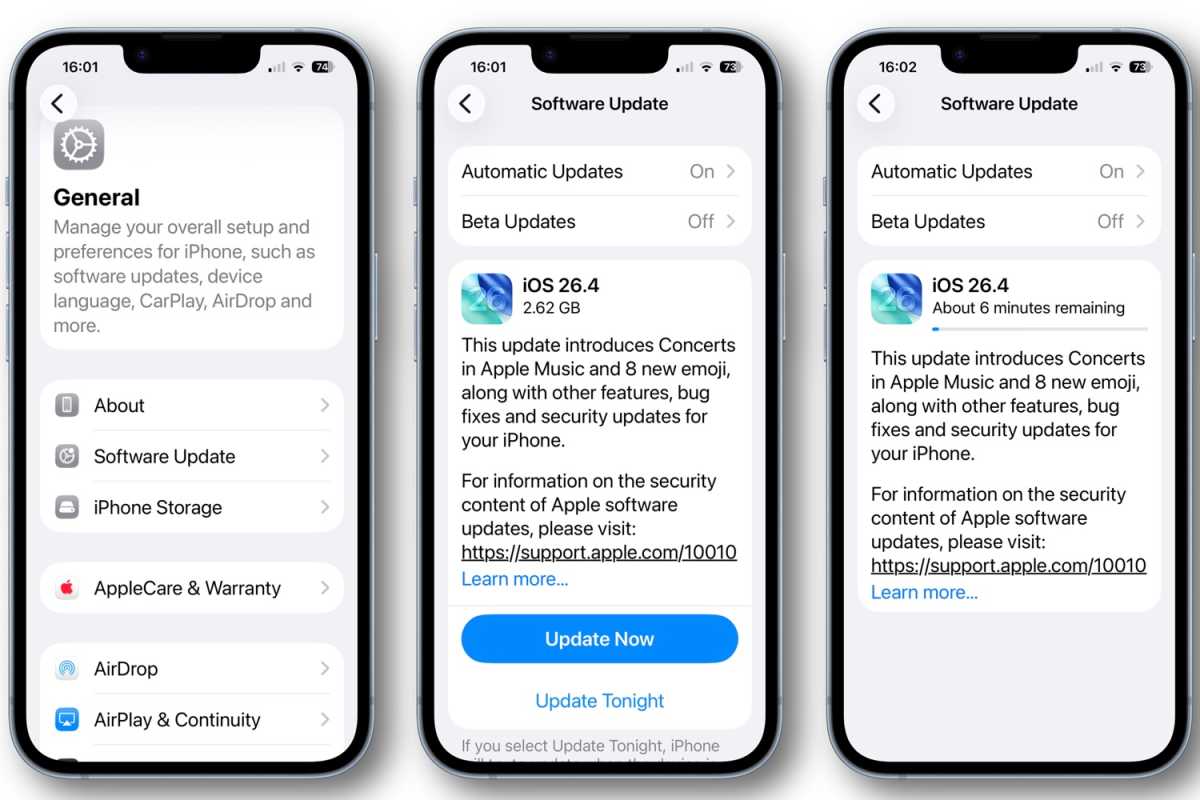
How to update iOS on iPhone
Foundry
See how to update iOS on your iPhone for more advice.