At a glance
Expert’s Rating
Pros
- Small and quiet
- Great performance for its size
- Large unified memory is great for AI
Cons
- The price is moving in the wrong direction
- Upgrade prices are crazy as ever
Our Verdict
Some things are objectively good, but still very hard to recommend. That’s how I feel about the Mac mini with M5 Pro. It delivers the performance improvement we expect to see two years after the prior model, but the price has gone up by even more than the performance. And Apple hasn’t made changes to the design or features to offset the plain simple fact that the value proposition—already a tough sell—has gotten worse.
Price When Reviewed
This value will show the geolocated pricing text for product undefined
Best Pricing Today
Best Prices Today: Apple Mac mini (M5 Pro, 2026)

It has been almost two years since Apple introduced the Mac mini with M4 and M4 Pro. Its replacement splits generations in an odd way: the less expensive model makes the leap to M6, while the higher-endl model gets an M5 Pro, rather than an M6 Pro. For all we know, there may never be an M6 Pro.
In the time between releases, due in part to the exploding costs of RAM and flash storage as the result of a race to build AI data centers, the Mac mini jumped up significantly in price. The M6 entry-level model costs a whopping $899, a full 50 percent more than the M4’s $599 starting price, and that still includes the same 16GB of RAM and 256GB of storage.
Two years ago, we loved the power and efficiency of Apple’s surprisingly small computer, but were dismayed by how much more you paid for even the most modest upgrades. This year’s model is the same computer with a faster chip, and the price has gone through the roof. Is it still a worthwhile purchase? Let’s dive in.
M5 Pro Mac mini: Preposterous pricing
The M4 Mac mini cost $599 in late 2024, with 16GB of RAM and 256GB of storage. It was a great starting price, but at the time we noted the greedy pricing of RAM and SSD upgrades: simply stepping up one level to 32GB and 512GB of storage cost another $600. In other words, Apple was charging as much for 16GB of RAM and 256GB of storage as an upgrade as it was for an entire computer with that same RAM and storage. Absurd!
It gives me no pleasure to say that pricing has gotten much worse. The starting price of this generation, the M6 Mac mini, is 50 percent higher at $899. It still has 16GB of RAM and a 256GB SSD. It still costs $600 to add another 16GB of RAM (a total of 32GB) and 256GB of storage (a total of 512GB).
Want the more powerful chip? The M5 Pro version, with a cut-back version of the chip that has fewer CPU and GPU cores, 24GB of RAM and a 512GB SSD, is $1,699. The same configuration of the M4 Pro model was $1,399. Basically, you’re paying $300 more to get your foot in the door with the Mac mini, a change that undermines its entire existence as a small and affordable Mac.
The version we’re reviewing here has the full M5 Pro chip (a +$200 upgrade), 48GB of RAM (+$600) an 1TB SSD (+$300), and 10 gigabit Ethernet (+$100). That’s $2,899. Two years ago, the M4 Pro version of this computer with these same specs cost $2,299, and even that felt high.
For reference, the Mac Studio with M5 Max (18-core CPU and 32-core GPU), 36GB of RAM, and a 1TB SSD is actually less expensive at $2,799, offers more ports, and has a much more powerful GPU.
I know the prices of all things related to computers have gone crazy lately, but this is just ridiculous and shows how disproportionate Apple’s upgrade pricing has gotten. Make it make sense, Apple.
M5 Pro Mac mini: Design
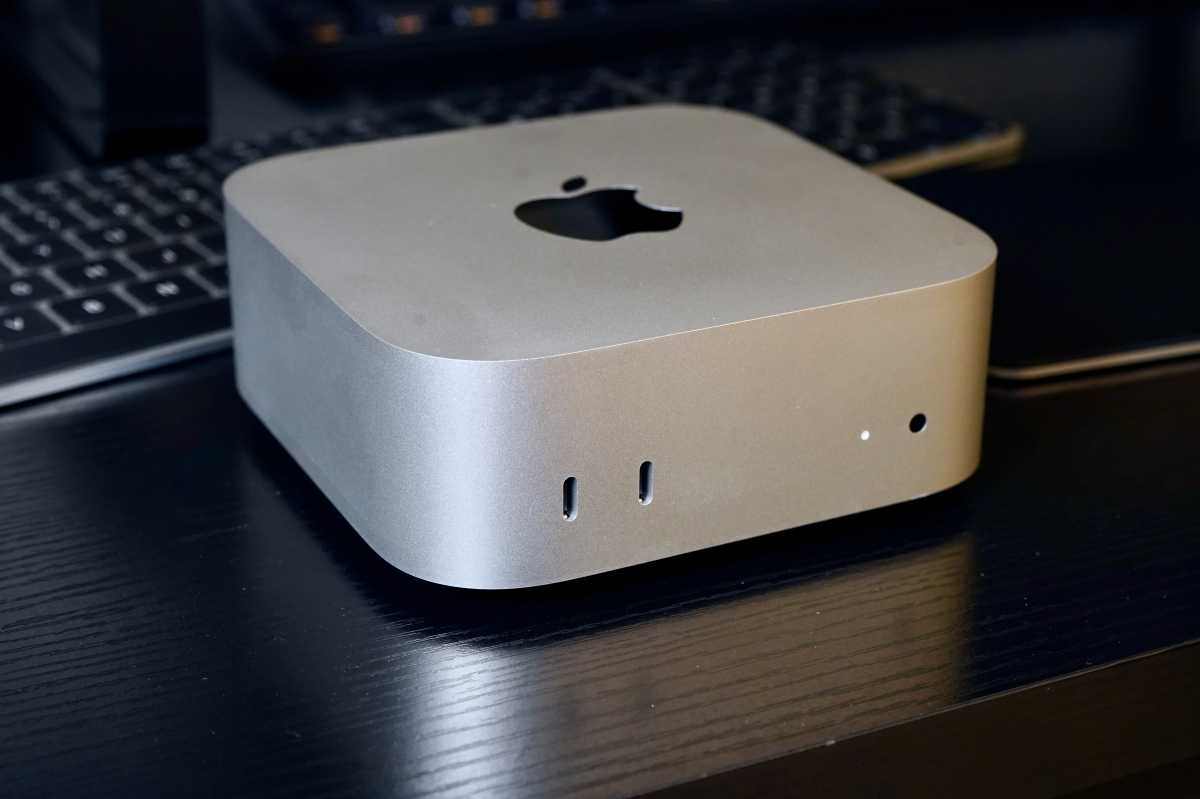
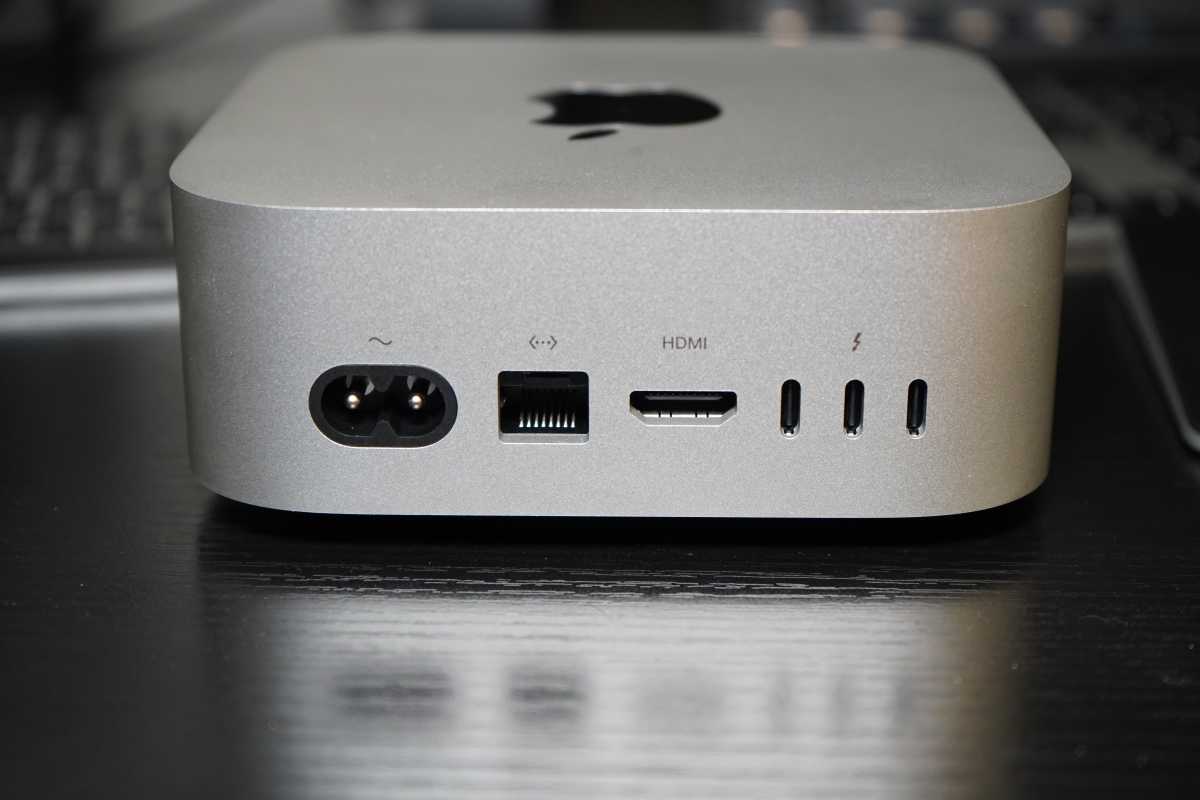
Physically, the new Mac mini is exactly like the two-year-old model. It has exactly the same dimensions, weight, and port configuration, including three Thunderbolt 5 ports on the back and two USB-C ports in the front.
Foundry
There are three small improvements worth noting, other than the obvious jump from the M4/M4 Pro to the M6/M5 Pro:
- The Ethernet port is a 2.5 gigabit port, rather than a gigabit port (you can still opt for a 10 gigabit port).
- It uses Apple’s N1 wireless chip, so you get Wi-Fi 7 and Bluetooth 6 (up from Wi-FI 6E and Bluetooth 5.3).
- The Thunderbolt 5 ports support higher resolutions and refresh rates when using multiple connected displays.
Foundry
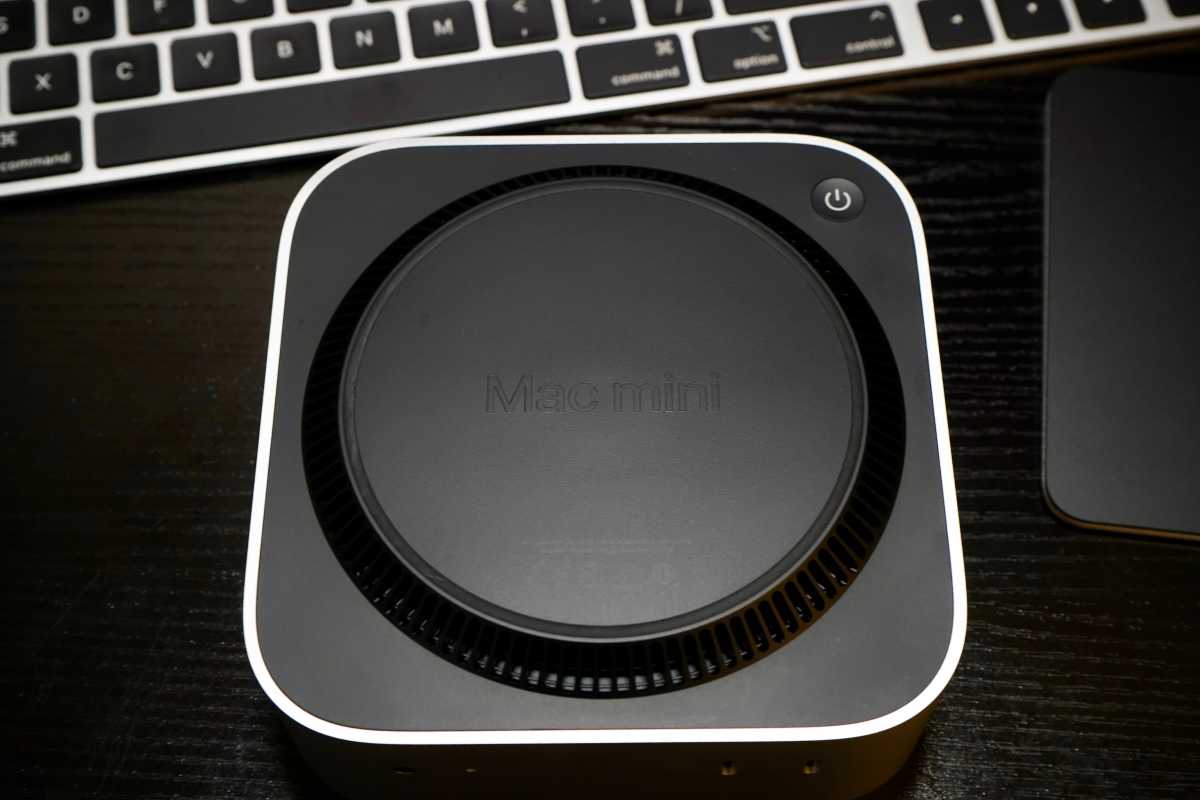
The bottom still has the same round ventilation riser and a recessed power button that is, for better or worse, rather hard to get to.
Foundry
M5 Pro Mac mini: Performance
After two years, what you’re really paying hundreds of dollars more for is the new chip. While the M6 is the newest generation, there are no higher-end “Pro” or “Max” versions of it. Instead, the higher-end Mac mini is the same M5 Pro introduced in the MacBook Pro about six months ago.
It’s quite a bit faster than the M4 Pro was, but we had reservations about the price/performance ratio on that computer and those have only gotten worse now. As time goes on, computers are supposed to get more powerful at the same price, or even cheaper. They’re not supposed to be 25 percent faster but cost 30% more. And yet here we are.
Geekbench 7
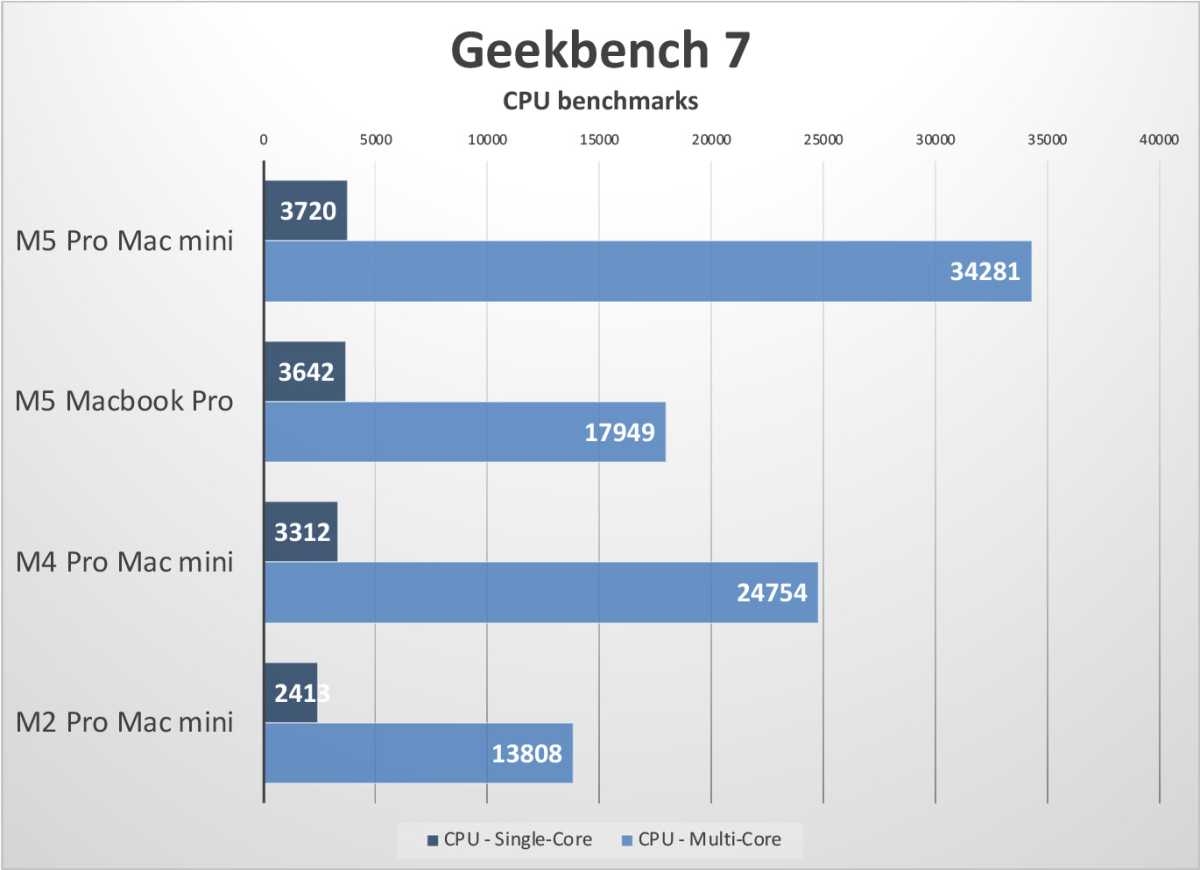
Let’s take a look at CPU and GPU compute performance with the latest edition of the ever-reliable Geekbench.
Foundry
That’s a 12 percent jump in single-core CPU performance over the M4 Pro from 2 years ago, and a bigger 38 percent jump in multi-core performance. We went form 14 cores (10 performance and 4 efficiency) to 18 cores (6 super and 12 performance), hence the big boost in multi-threaded CPU performance.
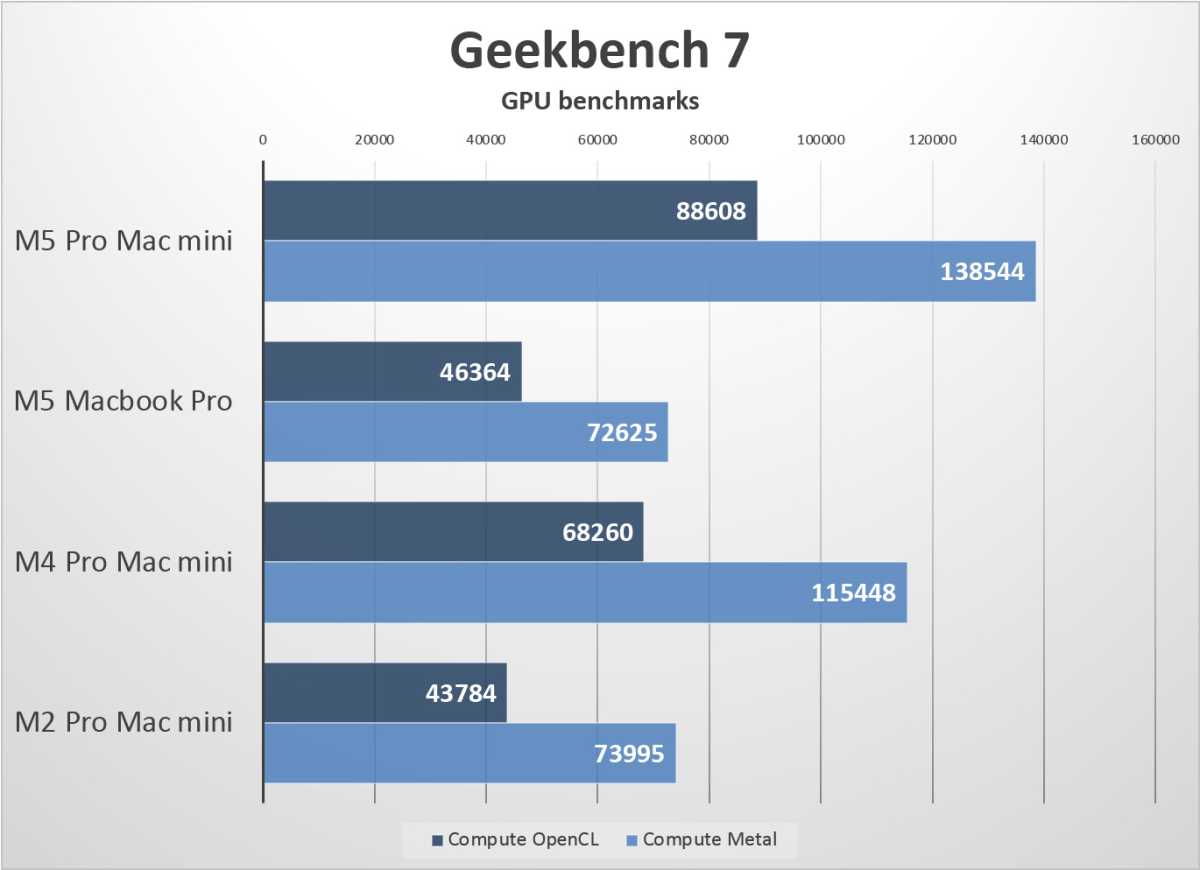
Let’s look at GPU compute power for the M5 Pro, which has the same 20 GPU cores as the M4 Pro.
Foundry
We’re looking at an improvement of around 20 percent for the GPU, partly from the higher-performing GPU cores and partly from the extra 12 percent of memory bandwidth.
Geekbench AI
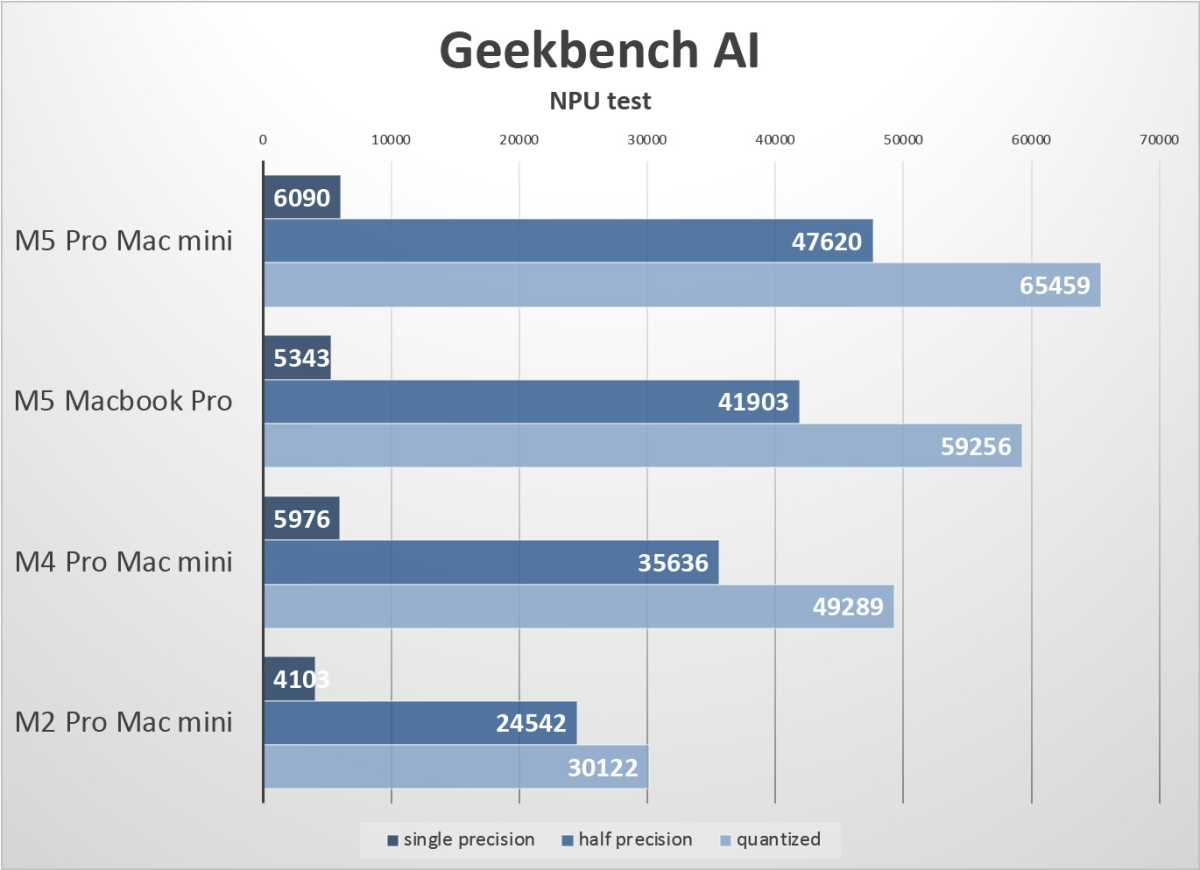
AI performance is becoming increasingly important. Even if you’re not a big user of local AI agents, Apple’s own machine learning tools are prevalent throughout the system, from Siri AI to Photos to Dictation and so much more. The Geekbench AI test lets you run a series of common ML tasks using the CPU, GPU, or Neural Engine. We’re interested in the latter’s performance here.
Foundry
Neural Engine performance keeps creeping upward, from the M4 Pro to M5 to M5 Pro. It’s about 33 percent faster in the low-precision data formats that are most often used when you’re not doing AI training.
We don’t have data for the M6 Mac mini yet, but this is one area where that much less expensive system could outstrip the M5 Pro model, possibly by a wide margin. With the Neural Engine doubled to 32 cores, we can expect lower-precision AI tasks where memory bandwidth isn’t the limit to run a lot faster.
Cinebench 2026
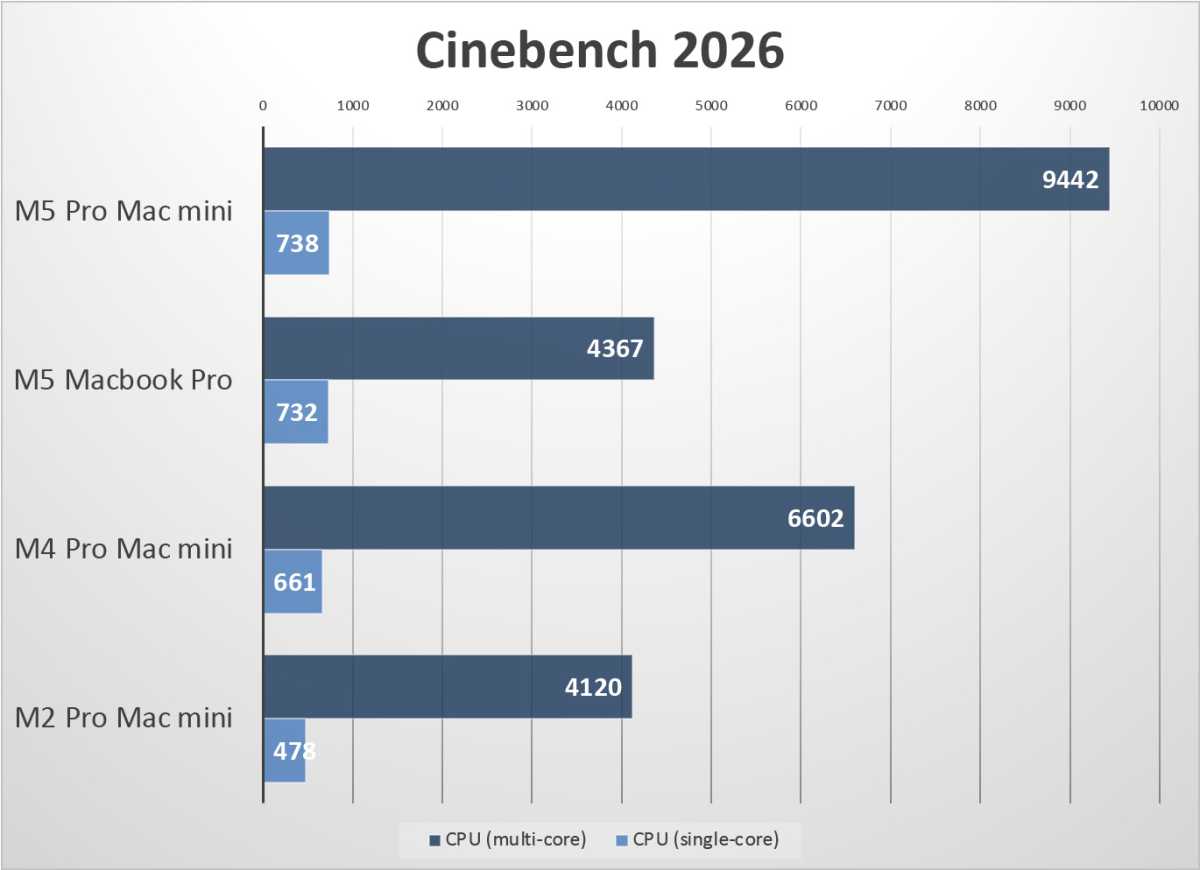
Cinebench is a great test of a certain kind of CPU performance as it renders “offline” computer graphics, the kind of high-quality but very slow rendering used in TV and film.
Foundry
A single core is only 11 percent faster, but when they’re all working at once, the higher core count and change to the core configuration in the M5 Pro make a big difference. Performance goes up by 40 percent, a big jump even when you consider its has been two years between products.
HandBrake video encode
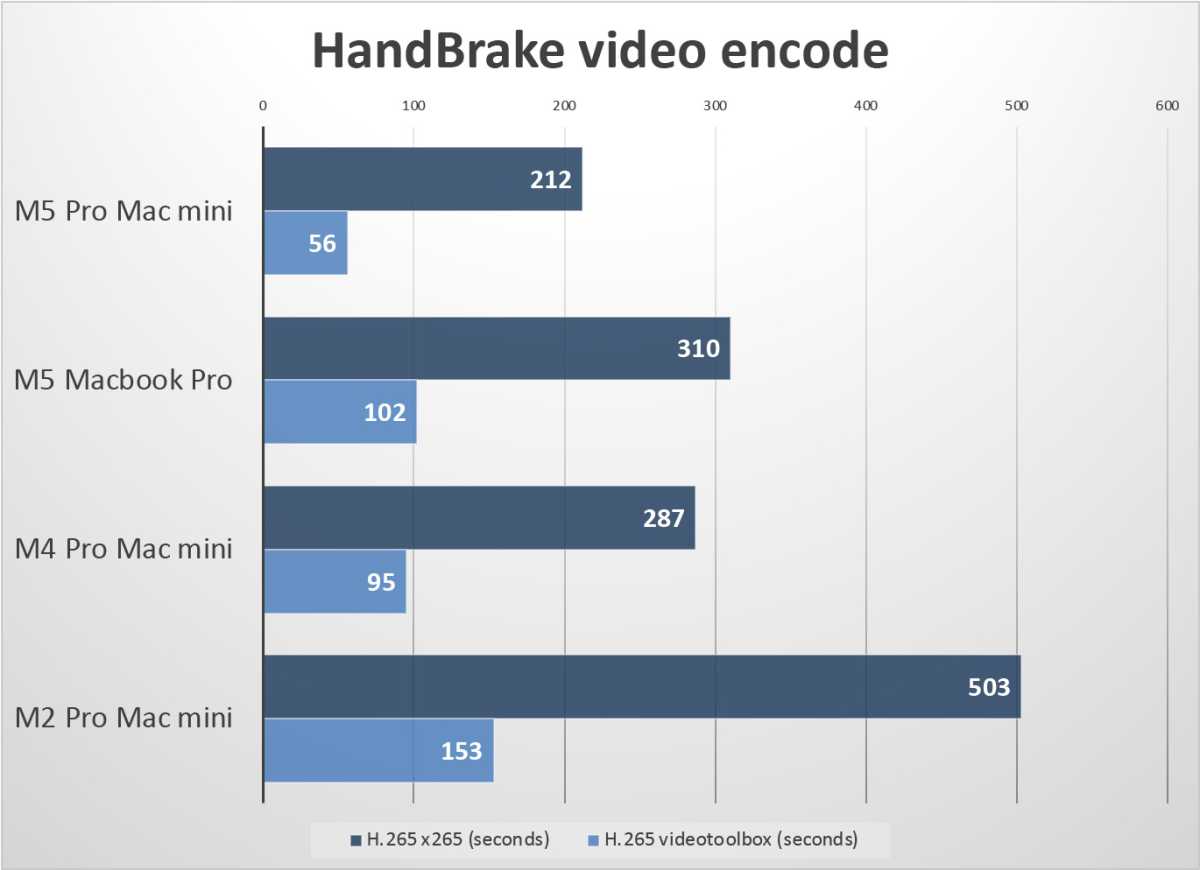
HandBrake uses standard video encoder libraries to transcode videos. We used the Creative Commons license Tears of Steel video in 4K, and transcode it down to a 1080p H.265 format, using both a CPU-based x265 encoder and the “videotoolbox” encoder that leverages Apple’s dedicated video encoding hardware.
Foundry
This test is a measure of how many seconds the transcode takes, so shorter results are better. Again, the increase in core count and configuration change results in a big multi-core CPU benefit, as the CPU-based encoder runs 26 percent faster. The newer hardware video encoder gets even a bigger boost, though—it’s done in 41 percent less time!
Game benchmarks
A Mac mini is not really a gamer’s machine. You’d be crazy to spend this kind of money on a Mac expecting to play the latest games, and the limited cooling potential of a little Mac mini enclosure makes it struggle and get loud when playing a high-end game. Still, game benchmarks tend to stress the entire system at once—the CPU, GPU, and memory—and are a great look at total system performance.
Foundry
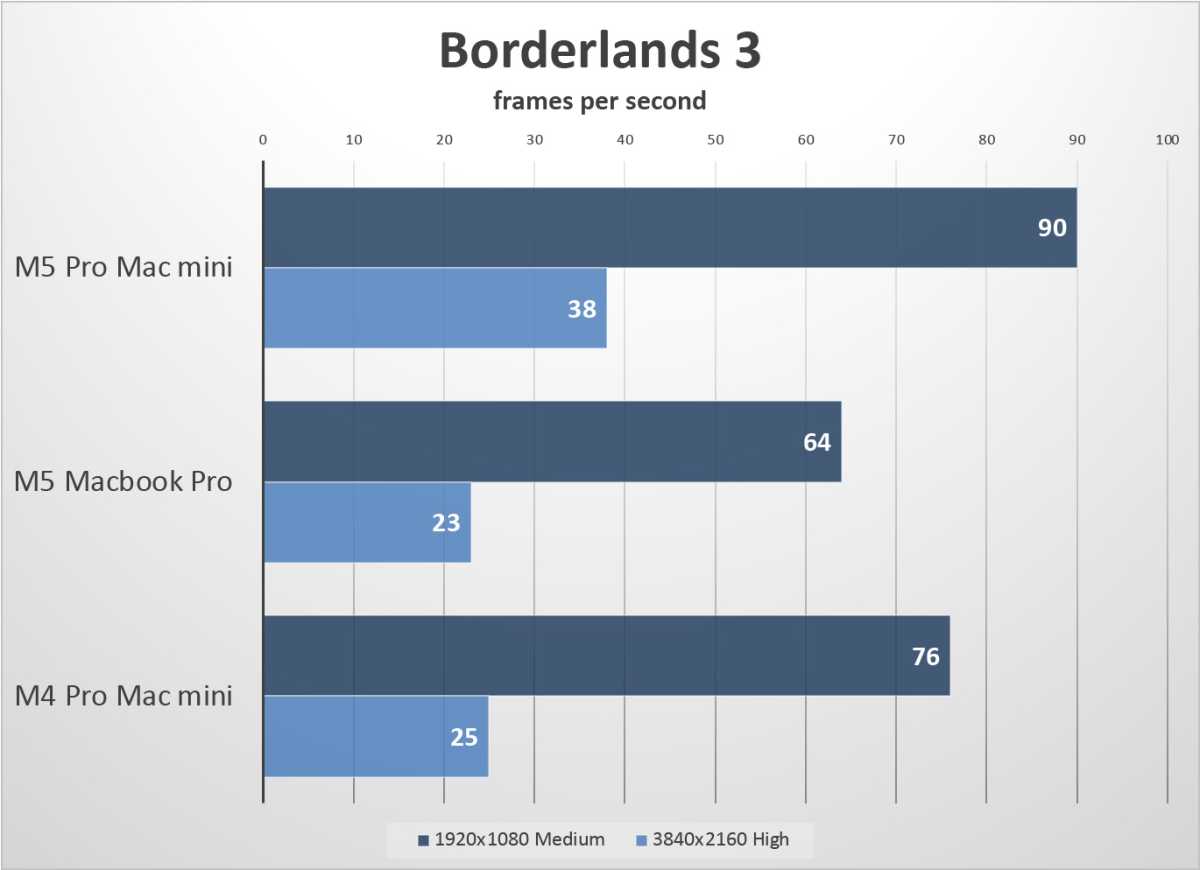
The Borderlands 3 test only runs a little faster at lower resolutions and settings. But Apple’s newer GPU, despite still only having 20 cores, runs the game much better at 4K and High settings. You get a 52 percent improvement with those particular settings, though it’s still not really very smooth, and we would recommend lower settings for anyone trying to play this on a Mac mini.
Foundry
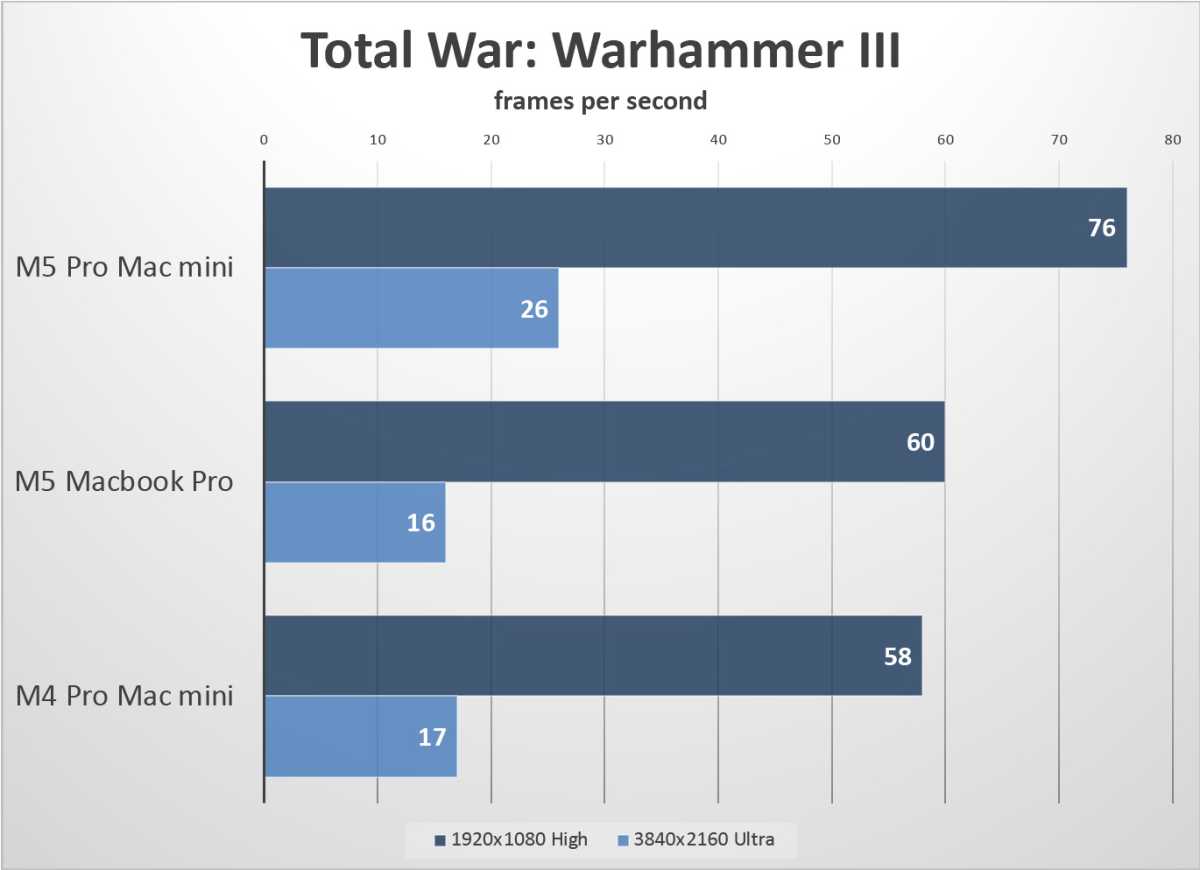
The real-time strategy game Total War: Warhammer III is very demanding, and at 4K the M5 Pro just can’t cut it. There’s still a 31 percent improvement at 1080p and High settings, however.
Foundry
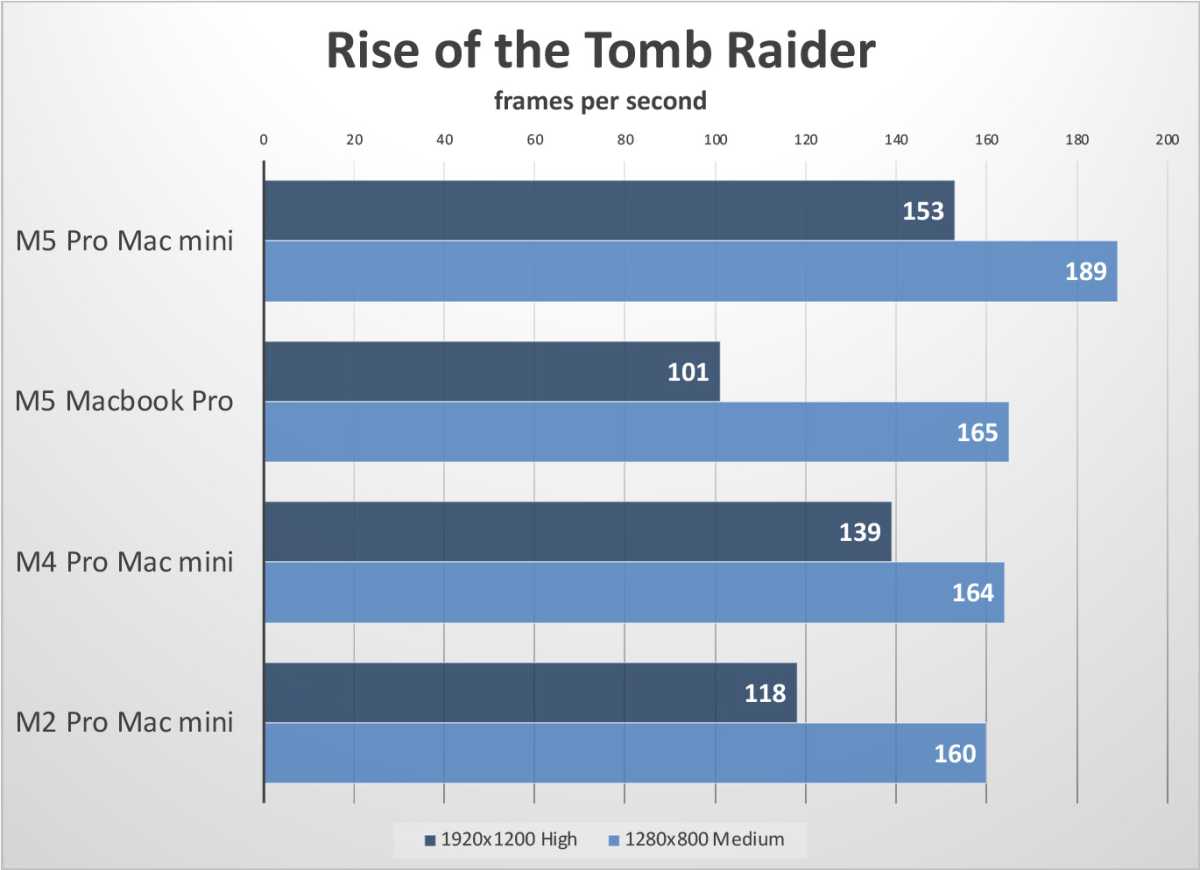
Rise of the Tomb Raider is getting a little old, and most modern Macs can run it quite well. The new Mac mini runs this game about 10-15 percent better than the one from two years ago.
Overall, the combination of more CPU cores in a higher-performing configuration, a bit more memory bandwidth, and a new GPU core design pays off for 3D games.
Blackmagic Disk Speed
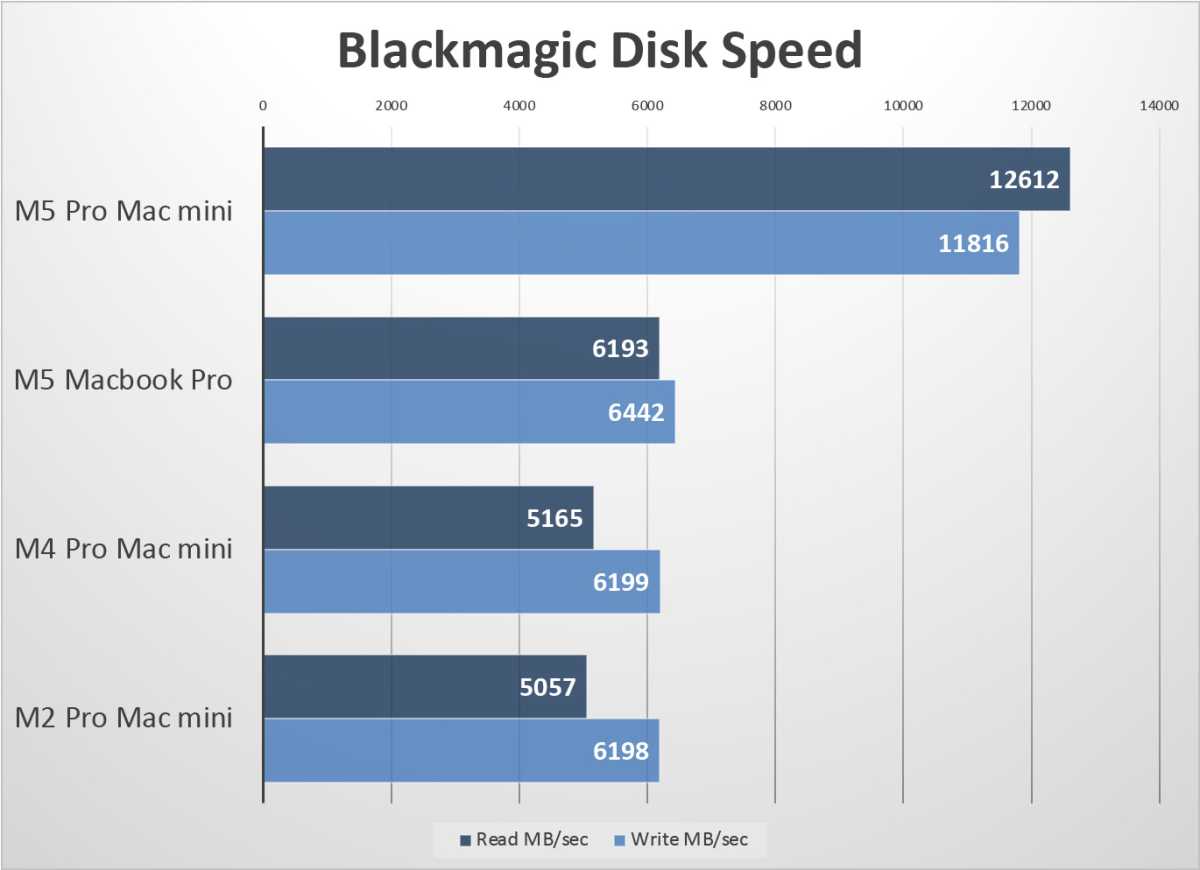
A final bit of great news as we close out the benchmarks. Apple’s latest SSD hardware is fully present here, offering a huge boost to performance where it was sorely needed.
Foundry
Back in the M1 and M2 days, Apple’s storage performance was second to none. But as you can see, it remained stagnant for years, and only recently doubled in performance with the latest generation. This puts it back on the level with some of the best Windows PCs you can buy.
Should you buy an M5 Pro Mac mini?
There’s not much to talk about with the new M5 Pro Mac mini other than performance. It looks identical to the 2-year-old model that preceded it, and have only modest improvements to wireless features and multi-display support that most users will probably not notice. So what we have, essentially, is the same computer as Apple was selling in late 2024, only faster.
The good news is, it’s an appropriate speed boost given the two year gap. A CPU speedup of 10-30 percent and a GPU improvement of 20-40 percent is what you can expect in most cases, which would be a lot for a year-over-year boost, but is about what we expect after two years between releases. It’s a respectable improvement. If the price was the same, we could confidently claim this is a very good update.
But the price is not the same. Two years ago, the base model of the Mac mini was a very good deal, but the value proposition quickly disintegrated when you started adding on Apple’s outrageously-priced upgrades.
Today, the base model is 50 percent more expensive and higher configurations cost hundreds of dollars more. The model I reviewed two years ago was $2,299 and configured almost exactly like the one I’m reviewing now, save for the M5 Pro instead of the M4 Pro. Now it costs you $2,899.
That’s not how it’s supposed to work. As time marches on, you’re supposed to get a faster computer for the same price or less. Or at least a bunch of new features to make up the difference. An identical machine that is 25-30 percent faster but costs 25-50 percent more is moving in the wrong direction. Of course, the current RAM and SSD crunch are affecting everyone, and every company writing a blank check for endless AI investment is to blame. The price increases that resulted from this are not Apple’s fault, but it is Apple’s problem.
This is a good computer at a bad price, and it’s not worth the upgrade if you’re not in desperate need of one. And if you are, I feel sorry for you; this is a terrible time to buy any computer.